Employee self service app: staff request from their phone, managers approve on site.
Employees sign in with their PIN, see their leave balance and open a request; the net days, with weekly rest days and public holidays deducted, are ready on the phone. The department supervisor approves the request in the field and the formal notification reaches the employee's phone; a rejection cannot be issued without a reason.
While an overtime request is being entered, the shuttle departure of the selected people is visible too. On the web, HR defines which cards appear on the phone and the response options for notifications; the employee's response lands on that day's timesheet row.
HR App for Employees and Managers — Features: 4 · Short films: 4
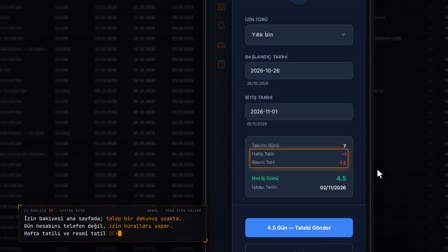 Feature 39 · 0:53
Leave from Your Phone
Balance, net days, overlap check: on the employee's phone
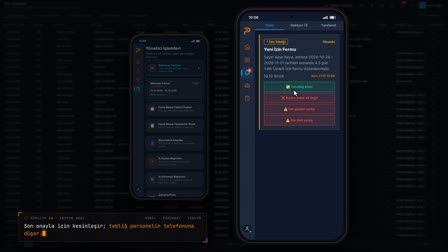 Feature 40 · 0:56
Approval from Your Phone
Approval, notification, balance and rejection reason: on two phones
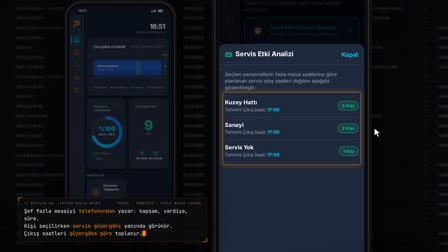 Feature 41 · 0:53
Overtime from Your Phone
Shuttle departures are visible while the overtime request is entered
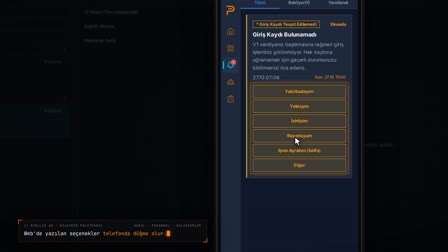 Feature 42 · 0:56
Notification Policy
Notification text and response options are written on the web
PIN login to the employee app: personnel number and mobile activation
Employees sign in with their employee number and PIN; at activation, a 4–6 digit PIN is set by entering it twice, sign-in on a registered device is by PIN, and the account is locked after failed attempts. A red bar appears when there is no connection, and a yellow bar when it is slow.
Employee portal app: leave balance, timesheet and work schedule
On their phone, employees see their annual leave balance and movements, daily clock-in and clock-out times for the month, and normal time, missing time and overtime. Their last clock-in or clock-out record, shift schedule, personal calendar and shuttle route are also in the app; home screen cards are enabled or disabled by location.
Time off request app
A request is opened with the leave type and date range; net working days and calendar days are calculated before sending, and the request can be canceled.
PPE request, workwear request and mobile asset handover confirmation
Personal protective equipment, workwear and asset requests are sent from the phone. An asset handover or return that arrives by notification is answered by accepting or rejecting it; the employee's assigned assets and PPE are listed.
Mobile incident report: accidents, near misses, sick notes and fingerprint read failures
Employees report an occupational accident with the place of the accident, witness statements and photos, and a near miss or a kaizen suggestion with photos. They submit a sick note with its dates and attachment, report a fingerprint or face scan problem to their manager, and write an explanation in reply to the no-entry question for a day when their card was not read.
My deductions, mobile announcements, surveys and legal notice acknowledgement
The debt summary, advances, wage garnishment files and deduction history are visible on the phone. Company announcements are recorded as read, and active surveys are answered; legal notices such as KVKK are shown full screen, and the I Have Read / I Confirm (Okudum / Onaylıyorum) response is stored with evidence fields; disciplinary decisions and defense requests are also here.
Manager app: who is in today, absentees and daily anomalies
In the same app, the manager switches to manager mode and sees who has come to work and who has not at the selected location, daily clock-in/clock-out anomalies and employee responses. A supervisor sees only the departments they are responsible for; which role uses which panel is set in the Manager Screens (Yönetici Ekranları) matrix on the web.
Mobile approval: leave, overtime, work schedules and incident reports
Pending leave requests are approved or rejected on the phone; the manager creates overtime requests for employees and manages the team's work schedule. Biometric issues are resolved, employee incidents and incident reports are opened from mobile, and İSG records and critical notifications are accessible.
Mobile management center: cards, notification policy and requests
From the web, home screen cards and menu items are configured per location, the notification policy sets who receives which notification, and template-based and scheduled notifications are sent.
Topics in Mobile HR
- Topic
Mobile Manager Panel
Manager app: supervisors see who came in, who didn't and daily anomalies; leave approval, overtime, work schedule, incident reports and İSG by phone.
- Topic
Employee Requests
Employee requests management: sick note approval into leave, PPE, workwear and asset assignment requests, employee feedback and issue reports.
Frequently asked questions
How do employees log in to the employee app?
The activation record is verified and a 4–6 digit PIN is set by entering it twice. After that, employees sign in with their employee number and PIN; the account is locked after failed attempts.
Can employees check leave balance and remaining days on their phone?
Yes. The annual leave balance and leave movements are visible in the app; the leave balance card on the home screen is enabled according to the location setting.
How to request time off in the app?
The leave type and date range are selected; net working days and calendar days are calculated before sending. The request is tracked in My Requests (Taleplerim) and can be canceled if needed; the manager approves or rejects it on mobile.
Can I see my timesheet and clock-in times on my phone?
Yes. Each day's clock-in and clock-out times for the month, as well as normal time, missing time and overtime, appear with a color-coded status.
Is there a shift schedule app for employees to view working hours?
Yes. The My Work Schedule (Çalışma planım) screen shows the shift schedule and overtime status, and the timesheet screen shows daily working hours.
What should an employee do if the fingerprint is not read?
With a biometric issue report, a fingerprint that could not be read, a failed face scan or a device fault is reported to the manager; an explanation can also be written in reply to the no-entry question for a day when the card was not read.
Can a sick note be uploaded in the app?
Yes. It is reported with the start of the sick note, the return-to-work date and a PDF, JPG or PNG attachment; HR approves the sick note and transfers it to the leave record, or rejects it with a reason.
Can managers approve leave on their phone?
Yes. In manager mode, pending leave requests are listed and approved or rejected. Which role sees this panel is set from the web.
Is the payslip shown in the mobile app?
No, the payslip is not shown in the mobile app today. Debt, advances, wage garnishment and deduction history are visible on the phone.
How are leave notifications and KVKK (Turkish data protection law) acknowledgements answered on mobile?
The legal notice and leave notification open full screen on the phone; the I Have Read (Okudum) or I Confirm (Onaylıyorum) response is recorded with evidence fields.
Can employees see advance debts and wage garnishment deductions on their phone?
Yes. The My Financial Deductions (Mali kesintilerim) screen shows the debt summary, advances, wage garnishment files and deduction history.
Are overtime and clock-in times visible on mobile?
Yes. The timesheet screen shows each day's clock-in and clock-out times and normal time, missing time and overtime; the My Work Schedule (Çalışma planım) screen shows overtime status.
What is employee self service (ESS)?
In Turkish, employee self service is called çalışan self servis: employees view and manage their leave balance, timesheet and requests themselves without asking HR. In Pulsar this is done with the HR app for employees; the ESS app is the app on the employee's phone.
Can employees send a salary advance request from the app?
Yes. The advance request is sent from the Requests (Talepler) menu on the phone and tracked in My Requests (Taleplerim) as Pending, Approved or Rejected. Whether the advance request appears on mobile and its limit are set in the advance policy on the web.
Let's talk about Pulsar HRM and your own processes.
Start with PDKS; add the field and enterprise layers as you need them.