Maintenance, break, shutdown: your bulk annual leave plan is ready
No searching for records in Excel: preview first, create in one click.
The screens in this film were recorded from the Turkish interface of Pulsar HRM.
Collective Leave Plan: collective annual leave planning
Before a shutdown, see who has leave entitlement; the system prepares who will take annual, advance or unpaid leave. Leave forms for hundreds of people are created, approved and formally notified in a single click; half-day administrative leave and group training leave are handled on the same screen.
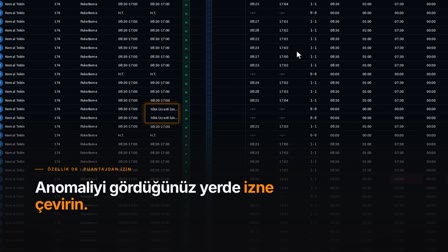
Annual leave planner: employee leave plan example and schedule
The employee × month annual leave plan matrix is displayed with server-side filters; the plan is analyzed and you move from the plan to the leave form.
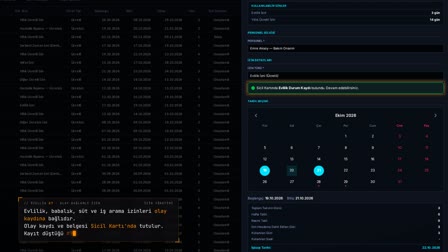
Factory collective leave period: Planned Holiday/Break and scope analysis
The plan name, date range and reserved annual leave days are entered, departments are selected and "Analyze Scope" ("Kapsamı Analiz Et") is clicked; employees' available and post-plan balances are listed, and those who will stay on duty are excluded. The record only holds the reserve; it does not create leave forms.
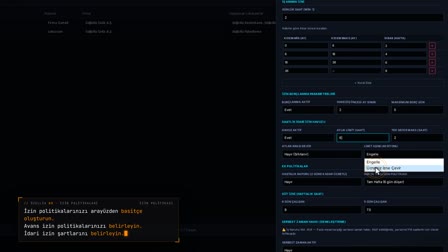
Bulk leave entry: annual, advance and unpaid leave
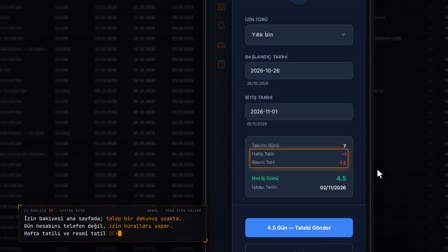
After the date range and scenario are selected, "Calculate and Report" ("Hesapla ve Raporla") shows annual, advance and unpaid days per person. In the "Mandatory: Annual → Advance → Unpaid" ("Zorunlu: Yıllık → Avans → Ücretsiz") scenario, annual leave is prepared first, then advance leave according to the borrowing rules in the policy, and unpaid leave for the remaining days; existing leave and sick leave days are preserved.
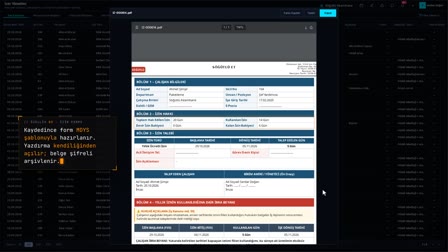
Leave approval in bulk: forms created, approved and formally notified
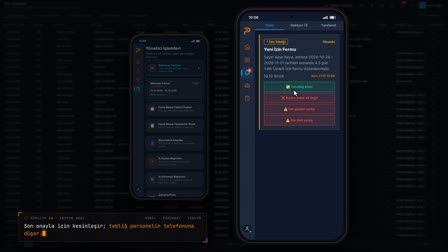
Forms are created as REQUEST with "Calculate and Save" ("Hesapla ve Kaydet") and approved with "Bulk Select and Approve" ("Toplu Seç ve Onayla"); a single Leave Notification (İzin Tebliği) is sent to each employee.
Half day leave as administrative leave and collective training leave
From the same screen, the administrative leave scenario is granted in half-day form (morning or afternoon); strike, lockout, other unpaid leave and training leave are also types that can be granted collectively. The shift balancing bar sits on the same panel.
How it works
- In Annual Leave Planning (Yıllık İzin Planlama), you open a "Planned Holiday/Break" ("Planlı Tatil/Ara") and enter the plan name, the date range and the reserved annual leave days.
- You select departments and press "Analyze Scope" ("Kapsamı Analiz Et"); employees' available and post-plan balances are listed.
- You remove those who will stay on duty and save; the plan is marked on the calendar.
- In Bulk Operations (Toplu İşlemler), you select the date range and scenario, and with "Calculate and Report" ("Hesapla ve Raporla") you see the annual, advance and unpaid days per person.
- With "Calculate and Save" ("Hesapla ve Kaydet"), the forms are created as REQUEST (TALEP); with "Select All and Approve" ("Toplu Seç ve Onayla") they are approved and formal notifications go out to each person.
Frequently asked questions
Does a Planned Holiday/Break record create leave forms?
No, it only holds a reservation. Available days are calculated as the current balance plus the entitlement accrued up to the plan date, minus earlier plans.
What if an employee's annual leave isn't enough for the plan?
In the "Mandatory: Annual → Advance → Unpaid" ("Zorunlu: Yıllık → Avans → Ücretsiz") scenario, annual leave is prepared first, then advance leave according to the policy's borrowing setting, and unpaid leave for the remaining days.
What happens to days when an employee already has leave or sick leave?
These days are preserved and shown separately on the summary screen. On approval, each employee is sent a single Leave Notification (İzin Tebliği).
What is collective leave?
Collective leave means sending a department or a workplace on leave together for the same date range. In Pulsar HRM, it is simulated by selecting the department and employee scope, and the forms are created and approved in a single operation.
Does bulk leave count as annual leave?
In Pulsar HRM, this depends on the selected scenario: in the annual leave scenario, the days are deducted from annual leave; if another type such as administrative leave or training is selected, the annual balance is not touched.
How to create an annual leave plan?
In the Annual Leave Planning (Yıllık İzin Planlama) matrix, the plan is entered and analyzed by employee × month; a reserve is set aside for maintenance or shutdowns with Planned Holiday/Break (Planlı Tatil/Ara), and you move from the plan to the leave form.
How to approve collective leave forms in bulk?
After the forms are created as REQUEST with "Calculate and Save" ("Hesapla ve Kaydet"), they are approved in a single operation with "Bulk Select and Approve" ("Toplu Seç ve Onayla"); approved forms can be printed in bulk.