Employee uniform sizes: entered once, filled in automatically at the next workwear handover.
Stock by size, and the size from the personnel record card.
The screens in this film were recorded from the Turkish interface of Pulsar HRM.
Size-Based Handover: workwear stock by size
Workwear stock is counted separately for each size; the size menu on the handover form shows the stock in that size. The size entered at handover is written to the employee's personnel record card and comes up automatically on the next handover form. When stock is at zero, handover doesn't stop; it shows up as open stock and is closed when the purchase invoice is entered.
Uniform tracking software that counts stock size by size
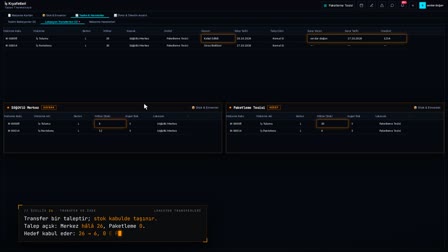
In Stock and Inventory (Stok ve Envanter), coveralls, work jackets and trousers appear with a separate quantity for each size. Rows below the minimum stock are red.
Bulk uniform issue form
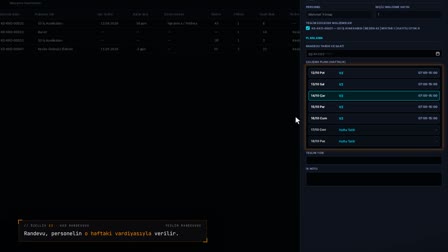
The bulk workwear handover form opens from the material movements. The employee is searched for, the item and size are selected, and the size menu shows the stock in that size.
The employee uniform size profile updates automatically
The size on an upper-body garment handover is written to the employee's upper-body size information; on the next handover, the same size comes up automatically. Sizes entered at onboarding are also written to pending requests.
Negative workwear inventory stays visible and is closed with a purchase invoice
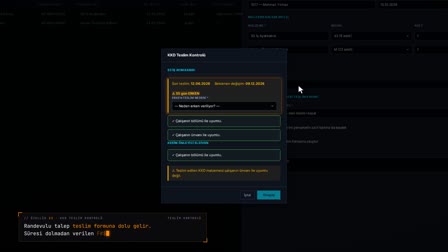
Even when stock is insufficient, the handover is deducted and the row goes negative. When a bulk purchase is entered from the row with Purchase Invoice (Satın Alma Faturası), the stock is corrected.
Uniform issue tracking: handovers and returns stay on each employee
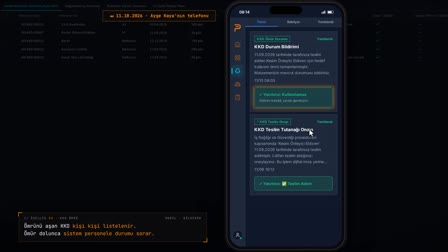
For workwear assignment tracking, every handover is written to Material Movements (Malzeme Hareketleri) under the employee's name; a return is taken only from that handover movement with Return from Employee, and the condition decides whether the item goes back to stock. At a new handover the system asks about the previous item: the old handover is closed or stays with the employee as a spare. Employees see their own workwear handovers in the mobile app.
How it works
- In Stock & Inventory (Stok & Envanter), you see the stock for each size on a separate row; quantities below minimum stock are shown in red.
- In Material Movements (Malzeme Hareketleri), you right-click to open the "Bulk Workwear Handover Form" ("Toplu İş Kıyafeti Teslim Formu") and select the employees and the item.
- In the size menu, each size shows the stock available in that size; you select the size and quantity and save.
- If the box for saving to the personnel record card is checked, the size is written to the employee's card; on the next handover form, the size is filled in automatically.
- From the row of a size that has gone negative, you enter a purchase invoice; once the invoice is processed, the stock goes back up.
Frequently asked questions
Can workwear inventory be tracked by size?
Yes. Stock & Inventory (Stok & Envanter) counts each size of each item on a separate row and shows quantities below minimum stock in red. The size menu on the handover form also shows the stock for each size next to it.
Do you have to enter employee uniform sizes at every handover?
No. When "Also save the entered size information to the employee's personnel record card" ("Girilen beden bilgilerini personelin sicil kartına da kaydet") is checked, the selected size is written to the record card. When the form is opened for an item in the Upper Wear (Üst Giyim) group, the size is filled in automatically from the upper-body size on the record card.
Can workwear be issued when stock is zero?
Yes. The handover is saved without a stock sufficiency check, and the shortfall appears as negative stock. When a purchase invoice is entered, the received quantity is added to stock.
How to create a uniform size chart for employees?
The list is not prepared separately: the size is entered on the onboarding form, and the employee's size information is updated with each handover.
How to do workwear inventory tracking?
In Pulsar, workwear tracking counts stock separately for each size; purchase invoices, handovers, returns, transfers and scrapping update the stock, and quantities below the minimum stock show in red.
Can workwear be issued if stock is insufficient?
Yes. The handover is deducted without checking stock sufficiency and the row goes negative; negative stock is closed with a purchase entry.
How to handle bulk uniform distribution?
On the bulk workwear handover form, handovers are entered for multiple items and employees, and the handover form is generated.
How is a uniform request for a new hire opened?
For a new employee, a workwear request is created automatically from the standard matrix and the size profile.
Can uniform allocation be set by department and job title?
Yes. Items are assigned in bulk to locations, departments and job titles, and the standard distribution report is exported to Excel.
How to get a workwear handover record?
On the bulk handover form, the "Print handover form after saving" box is checked by default; once the handover is saved, the form downloads as a PDF. The handover document's number can be entered in the optional Document No field.