Leave management software: entitlement, form, approval and document in one record
In Pulsar, leave is not a table row but an official process. The number of days is calculated from the employee's own work schedule; the moment the form is saved, the document is prepared and printing opens. Leave such as marriage, paternity, nursing and job-search leave is tied to the event record on the Personnel Record Card (Sicil Kartı): no event, no leave.
Rules for excused leave, advance leave, hourly administrative leave and working-time balancing are defined in the interface; nothing can go below the legal minimum. For maintenance periods, breaks or shutdowns, you see in advance who will take which leave, and leave forms for hundreds of people are created in a single operation. Employees open leave requests on their phones; managers approve them in the field.
Leave Tracking and Leave Management Software — Features: 7 · Short films: 7
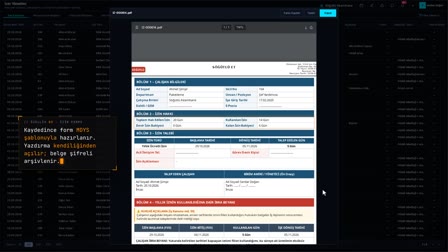 Feature 05 · 0:44
Leave Form
Calculated from the work schedule, an official document via MDYS
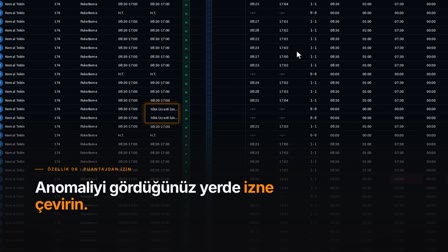 Feature 06 · 0:39
Leave from the Timesheet
Without losing context: select, right-click, save
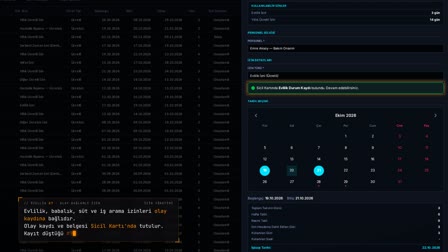 Feature 07 · 0:48
Event-Based Leave
The entitlement comes from the event record on the Personnel Record Card
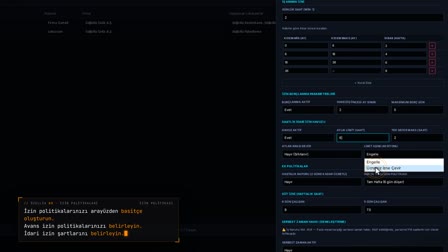 Feature 08 · 0:40
Leave Policies
Advance leave, administrative leave and working-time balancing; legal minimum locked
 Feature 09 · 0:51
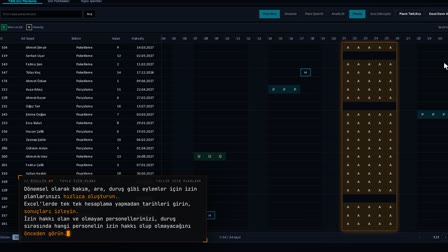
Collective Leave Plan
No searching for records in Excel: preview first, create in one click
 Feature 39 · 0:53
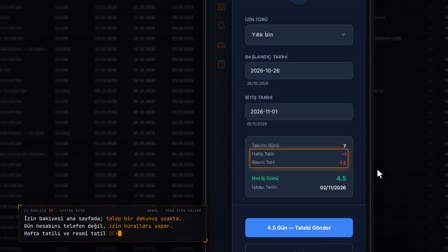
Leave from Your Phone
Balance, net days, overlap check: on the employee's phone
 Feature 40 · 0:56
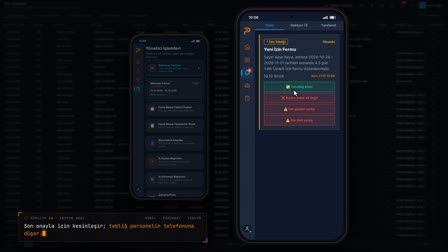
Approval from Your Phone
Approval, notification, balance and rejection reason: on two phones
Leave application form: leave days and return-to-work date from the work schedule
A leave form is opened with the employee, leave type, dates and usage type (full day, half day, hourly). Calendar days, days counted toward leave and the return-to-work date are calculated; weekly rest days are taken from the employee's own work schedule and public holidays are deducted separately. For saved leave, a PDF leave form is generated from the mDYS template and printed.
Leave approval workflow: approve, reject and cancel
A leave form is approved, rejected with a rejection reason or canceled; the work schedule and timesheet are refreshed at the moment of decision. An employee's request passes through the steps in the approval matrix; the person who must decide sees the pending request on the web or in the mobile app.
Annual leave tracker: entitlement, accrual, carry-over and leave balance
Leave balances are listed per employee with initial carryover, effective carryover, accrued, used, remaining and next accrual date. Annual leave accrual is calculated by length of service; leave history shows accruals, usage and movements in a single list.
Excused leave, hourly leave tracking and event-based leave
Marriage, bereavement, paternity, maternity/birth, pregnancy, nursing leave, periodic checkups, job-search leave and treatment of a disabled child are recorded with a document; the leave entitlement tied to the event opens with that record. The hourly administrative leave pool is tracked against a monthly limit and renewed.
Leave policies: company and location rules
With a general or location policy, annual leave seniority rules, excused leave days, the hourly administrative leave pool, leave borrowing (advance leave) and free time (working-time balancing) parameters are defined. Values below the legal minimum are not accepted.
Annual leave planner and bulk leave
The plan is analyzed in the employee × month annual leave plan matrix, and you move from the plan to the leave form. A planned break for maintenance or a shutdown is defined and its scope previewed; the bulk leave simulation identifies those with insufficient balance, creates the forms and approves them in bulk.
Annual leave tracker with Excel: leave tables to Excel, carry-over from an Excel template
Leave lists are exported to Excel, PDF or by email. For carryover, a template is downloaded, the file is checked and an error report is produced; correct rows are applied. If needed, an initial carryover is entered manually for an employee, or the effective carryover is corrected with an explanation.
Public holidays update automatically
Fixed holidays as well as religious holidays and their eves are written automatically from official sources four times a year; the list can also be completed manually. The leave day calculation and the work schedule use this list.
How does leave show up in the timesheet and payroll?
Approved leave is written to the daily schedule and the timesheet row is recalculated. The leave form is classified by SGK (Social Security Institution) missing-day reason code and marked as payroll-ready or not. Multi-day full-day leave with clock-in/clock-out records within its range is rejected.
Time off request app: leave requests from the employee's phone
With their PIN, employees see their leave balance on the phone and open a request; net days and the return-to-work date are calculated with the leave rules on the server, and a request that overlaps existing leave is blocked. Approved leave arrives on the employee's phone as a formal notification.
Frequently asked questions
How to calculate annual leave entitlement?
Pulsar HRM calculates annual leave accrual by length of service; the seniority tiers are defined in the leave policy. Under Article 53 of Turkish Labor Law No. 4857 (İş Kanunu), leave cannot be less than 14 days for service of one to five years (including five years), 20 days for more than five and less than fifteen years, and 26 days for fifteen years (inclusive) or more.
How to fill in a leave request form?
In Leave Forms (İzin Formları), the employee is selected with "Add New Leave" ("Yeni İzin Ekle"); the type is chosen from the Available Leave (Kullanılabilir İzinler) list and the date range from the calendar. The day count and return-to-work date are calculated from the work schedule; on saving, the document is prepared and printing opens.
How to request excused leave?
Event-based leave such as marriage, paternity and nursing leave opens with the event record and its document on the Personnel Record Card (Sicil Kartı); without the record, the leave form is not saved. Excused leave days are defined in the leave policy.
How to track annual leave and leave balances?
On the leave balances screen, each employee's carryover, accrual, used and remaining leave and next accrual date are listed; leave history shows all movements. Lists are exported to Excel, PDF or by email.
Does bulk leave count as annual leave?
In Pulsar HRM, bulk leave is prepared according to the selected scenario: in the "Annual → Advance → Unpaid" scenario, days are first deducted from annual leave, any shortfall becomes advance leave according to the policy's borrowing setting, and the rest becomes unpaid leave. Another scenario, such as administrative leave, can also be selected.
How is hourly leave calculated?
For hourly leave, the hours used are taken from that day's missing time; the hourly administrative leave pool is tracked against a monthly limit. The leave is deducted from missing time and added to normal time.
Who approves leave in the approval chain?
The approval workflow is defined per location in the approval matrix; at each step, the approver is determined by role, job title, department or position, for example the department manager or the department supervisor. The person who must decide sees the pending request on the web or in the mobile app.
Are public holidays deducted from leave days?
Yes. Public holidays are deducted in the leave day calculation, and weekly rest days are taken from the employee's work schedule; the return-to-work date is found by skipping weekly rest days and public holidays.
Can the leave form list be exported to Excel?
Yes. Leave lists are downloaded as Excel and PDF or sent by email.
Can an unpaid leave request be rejected?
In Pulsar HRM, every leave form can be approved, or rejected with a written rejection reason; the reason appears in the result notification sent to the employee. Whether a request can be rejected depends on workplace rules and legislation; the product does not make this decision.
Let's talk about Pulsar HRM and your own processes.
Start with PDKS; add the field and enterprise layers as you need them.