Not everyone at the gate is your employee: contractors and external workers go in a separate register
Same turnstile, separate ledger: tracking limited to the assignment period.
The screens in this film were recorded from the Turkish interface of Pulsar HRM.
External Workers: subcontractor and external worker tracking
Consultants, day laborers and outsourced service staff are tracked in a separate record: their card and face passes do not enter timesheets, leave, overtime or payroll. The assignment period is the limit; periods cannot overlap and passes outside the period are not counted. Time spent at the plant and documents stay on the person's own record.
External worker record and assignment period
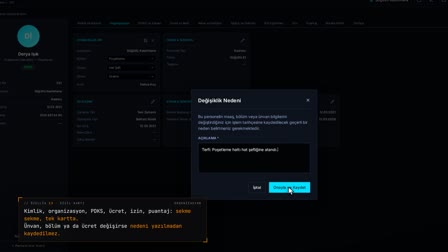
In Personnel Management (Personel Yönetimi), "Add External Worker" ("Dış Görevli Ekle") is used to enter the first name, last name and card number; the period, type, company and role are entered in Assignment History (Görev Tarihçesi). The record opens together with the first assignment period, and the details can be updated later.
Overlapping assignment periods cannot be added
Assignment periods are dated; a new period that overlaps the existing one is rejected. Passes outside the period and location are not counted.
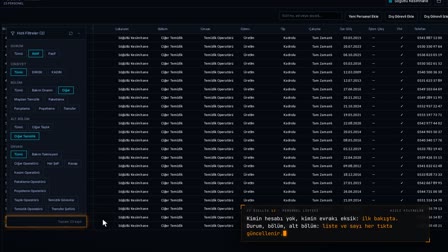
External workforce monitoring: list and status
External workers are listed in a grid that can be filtered by job title, tracking period and last pass time; the status is calculated from the dates as Active, Upcoming or Ended.
Contractor passes, daily duration and time spent at the plant
For the selected date range, the first entry, last exit, total duration and number of records are shown day by day; the total time at the plant for the period and the latest status are in the same drawer.
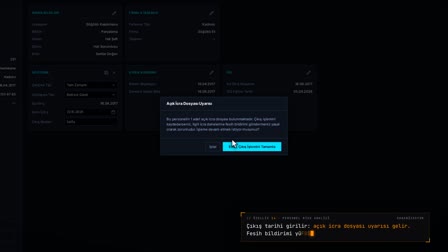
Subcontractor document management: İSG (occupational health and safety) files in the person's record
Documents belonging to the external worker are uploaded, viewed and deleted when necessary; the document name is formed from the file name.
Kept out of timesheets, leave and payroll
The raw passes of a person recorded as an external worker are not transferred to the timesheet; they do not enter the work schedule, leave, overtime or payroll.
How it works
- In Personnel Management (Personel Yönetimi), you select "Add External Worker" ("Dış Görevli Ekle") and enter the first name, last name and card number under General Information (Genel Bilgiler).
- In Assignment History (Görev Tarihçesi), you enter the assignment period, type, company and role, then click "Use First Period" ("İlk Dönemi Kullan").
- With "Create" ("Oluştur"), the external worker record opens together with its first assignment period.
- In External Worker Monitoring (Dış Görevli İzle), you track records by Active, Upcoming or Ended (Aktif, Gelecek, Sona erdi) status.
- With a right-click, you see the passes, and from Edit › Documents (Düzenle › Evraklar) you upload documents to the person's record.
Frequently asked questions
Do external workers' passes affect the timesheet or payroll?
No. The external worker record only tracks card and face passes; it does not enter the work schedule, timesheet, leave, overtime or payroll.
What happens to turnstile passes outside the assignment period?
Passes outside the assignment period and location are not counted. A new assignment period that overlaps the current one cannot be added for a person either.
Can you see how long an external worker spent at the plant?
Yes. On the passes screen, the total time at the plant for the selected period, the latest status, the first and last pass and the daily pass statuses are shown.
What happens to passes outside the assignment period?
Passes outside the assignment period and location are not counted. A new assignment period that overlaps the current one cannot be added for a person either.
Can a subcontractor's working hours and time at the plant be viewed?
Yes. On the passes screen, the total time at the plant for the selected period, the latest status, the first and last pass and the daily pass statuses are shown.
How to track contractor and subcontractor employees?
In Pulsar HRM, a subcontractor employee is recorded as an external worker, with their assignment period and company. In External Worker Monitoring (Dış Görevli İzle), their status, last pass and daily duration are tracked, and their documents are uploaded to their record.
Who keeps the timesheet for subcontractor workers?
Pulsar HRM does not produce a timesheet for a subcontractor employee; their passes are not transferred to the timesheet and are tracked only as an informational duration.
Where are contractor documents uploaded?
In External Worker Monitoring (Dış Görevli İzle), right-click to open Edit › Documents (Düzenle › Evraklar); you enter the document name and upload the file, and the document is linked to the person's record.