Shift planning software: build the work schedule once, overtime and shuttles follow from it
The work schedule is analyzed before it is saved: night work by pregnant employees and under-18s, shifts outside the fixed pattern and physician restrictions are listed by person and by day. Overtime starts from the plan; no request can be opened for employees on leave or sick leave, and requested and actual hours are shown on the same screen.
The employee shuttle plan isn't prepared separately; it is derived from the work schedule. A route that exceeds effective capacity is flagged as needing correction. Before changing a team's shift, the simulation shows people, vehicles, occupancy and cost per route before and after, side by side.
Shift Planning, Overtime and Employee Transport Planning — Features: 5 · Short films: 5
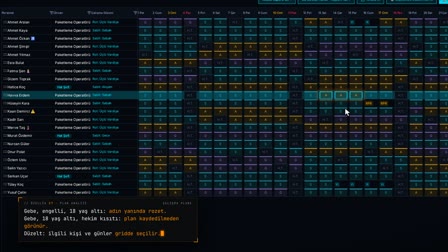 Feature 27 · 0:54
Schedule Analysis
Pregnancy, under 18, physician restrictions: visible before the schedule is saved
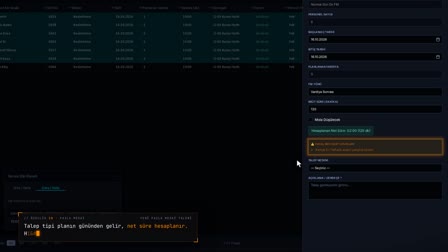 Feature 28 · 0:55
Overtime
Planned and worked, on the same screen
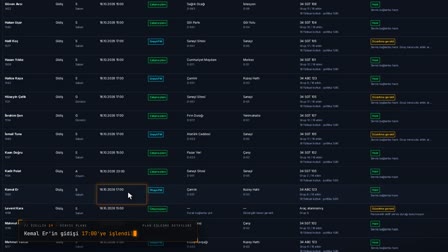 Feature 29 · 0:52
Shuttle Plan
Approved overtime, effective capacity, correction request
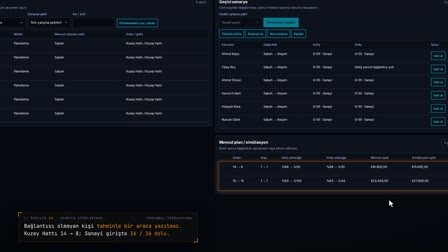 Feature 30 · 0:49
Shift Simulation
Scenario, before/after, central approval, publishing
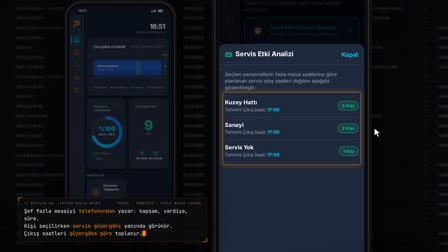 Feature 41 · 0:53
Overtime from Your Phone
Shuttle departures are visible while the overtime request is entered
Work schedule creation: automatic shift schedule with the Plan Wizard
The Work Schedule Wizard (Çalışma Planı Sihirbazı) automatically builds the schedule for the selected employees for the specified number of months, based on a fixed shift, rotation or timesheet template. The location's month opens in an employee × day matrix and is narrowed with the department filter; cells show shifts, weekly rest days, leave, sick leave and public holidays together.
Rotating shift schedule, fixed shifts and shift schedule templates
A fixed shift, sequential rotation or custom template pattern is assigned to employees with an effective start date; the same pattern can be given to several employees in a single action. Every pattern change is stored with its date, and the timesheet reads the work pattern in effect on that date from here. A weekly scheduler extends the schedule forward according to its cycle.
Shift changes and rotating rest days: moving the weekly day off
On the selected days, the shift of one or more employees is changed. The weekly rest day is moved to another day, a shift is assigned to the former rest day, and a warning based on Article 46 of Turkish Labor Law No. 4857 (İş Kanunu) is shown. A change that affects a calculated timesheet requires the session PIN; a change to a day whose payroll is finalized or whose timesheet has been submitted is rejected with an explanatory message.
Workforce planning: weekly projection, daily summary and working hours
The weekly projection shows the total norm, headcount and shortage/surplus by department. The daily summary gives the number of employees on shift, on leave, on sick leave, on their weekly rest day and unassigned on the selected day.
Daily, weekly and monthly shift schedule example: shift plan and duty roster
For example, in a department rotating through morning, evening and night shifts, each row of the work schedule table is an employee and each column is a day; the cell holds that day's shift code or weekly rest day, leave, sick leave or public holiday. Badges for pregnant, nursing, disabled and under-18 employees appear next to the employee's name; unsaved changes can be undone.
Schedule analysis and policy engine: maximum working hours per week
"Analyze" ("Analiz Et") scans the schedule for night work by pregnant, nursing and under-18 employees (statutory restriction), night work by employees with disabilities and physician restrictions (company or physician rule), days outside the rotation or template, and missing work patterns; open violations are listed in the panel and resolved ones are closed. The policy engine holds the rules for maximum weekly working time, maximum weekly overtime, rest between shifts, night work duration and the weekly rest day; statutory rules are read-only, and the company can add stricter rules.
Shift definitions: hours, breaks, tolerance and rounding
The building block of the schedule is the shift definition: code, hours, breaks, late arrival and early departure tolerance, rounding and the night multiplier are kept in a single record; rotations and ready-made templates are set up on the same screen.
Overtime planning and overtime tracking
An overtime request is opened from the day's schedule; no request can be opened for employees who are on leave, on sick leave or have no schedule. Requests are approved in bulk, compared with actual overtime and reported weekly, monthly or yearly.
Employee transport management and the shuttle impact of shift changes
The Shuttle Impact Panel (Servis Etki Paneli) in the Work Schedule (Çalışma Planı) previews the inbound/outbound shuttle distribution of a draft or saved schedule by route; the same panel is also on the overtime screen. The Employee Shuttle (Personel Servisi) module measures inbound and outbound people, required vehicles and empty seats by shift window; routes and stops are designed, and the impact of a shift change is simulated.
Frequently asked questions
How to create a work schedule?
First, a fixed shift, rotation or template pattern is assigned to employees. The Work Schedule Wizard (Çalışma Planı Sihirbazı) builds the schedule for the selected number of months based on this pattern; exception days are changed in the matrix, and a compliance check is run with "Analyze" ("Analiz Et") before saving.
How to make a shift schedule?
Shifts are defined with hours, breaks and tolerance, and a rotation or template is set up. The Plan Wizard applies this pattern to the selected employees and builds the monthly roster in an employee × day matrix; the roster can later be edited cell by cell.
How to change an employee's shift?
In the matrix, the day or days are selected, and "Assign / Change Shift" ("Vardiya Ata / Değiştir") or "Free Shift Change" ("Serbest Vardiya Değiştir") is chosen from the right-click menu. If the change affects a calculated timesheet, saving requires the session PIN, and the related timesheet is recalculated.
Does the weekly day off have to be Sunday?
In Pulsar HRM, the weekly rest day is taken from the employee's work schedule and can be moved to another day with a weekly rest day swap. During the swap, a warning based on Article 46 of Turkish Labor Law No. 4857 (İş Kanunu) is shown; the user who builds the schedule makes the decision.
How is the 45-hour working week calculated?
Under Article 63 of Turkish Labor Law No. 4857 (İş Kanunu), working time is generally at most 45 hours per week. In Pulsar HRM, the policy engine provides the maximum weekly working time for the work pattern; if an overtime request exceeds it, a "Maximum weekly working time" ("Haftalık azami çalışma süresi") warning appears.
Can pregnant or breastfeeding employees work night shifts?
Pulsar HRM handles this as a schedule check: "Analyze" ("Analiz Et") reports night shifts of pregnant, nursing, disabled and under-18 employees by person and by day; as soon as a night shift is selected for a pregnant employee, a "Night work restriction for pregnant employee" ("Gebe personel gece çalışma kısıtı") warning appears. The warning cannot be hidden; the decision stays with the user who builds the schedule.
How to create a duty roster?
A duty or shift roster is prepared in the Work Schedule (Çalışma Planı) as an employee × day matrix: a rotation or template is defined, applied for the month with the Plan Wizard, and exception days are changed cell by cell.
Is there employee scheduling software that builds the shift schedule automatically?
Yes. After a fixed shift, rotation or template pattern is assigned to employees, the Work Schedule Wizard (Çalışma Planı Sihirbazı) automatically builds the roster for the selected number of months based on this pattern; a weekly scheduler extends the schedule forward according to its cycle.
Can a work schedule be prepared as a draft?
Yes. Changes in the matrix stay in draft until saved and can be undone; the Shuttle Impact Panel (Servis Etki Paneli) also shows the shuttle impact of the draft schedule. If a change affects a calculated timesheet, saving is confirmed with the session PIN.
What is a rotating shift schedule?
A shift rotation is the cycling of shifts in a set order, for example morning, evening and night. In Pulsar HRM, a rotation is set up as a sequence in the shift definitions and assigned to employees as a work pattern.
Let's talk about Pulsar HRM and your own processes.
Start with PDKS; add the field and enterprise layers as you need them.