Employee medical surveillance: the physician's decision does not stay in the file; it warns in the work schedule.
An examination restriction becomes a critical warning in the work schedule.
The screens in this film were recorded from the Turkish interface of Pulsar HRM.
Physician's Decision: pre-hire and periodic medical exam tracking
Employees without a pre-employment medical examination appear automatically in the examination calendar; when an appointment is created, a notification reaches the employee's phone. The physician enters a "Conditionally Fit" ("Şartlı Uygun") decision and a night-work restriction; a fitness action is opened for HR. When the planner assigns a night shift to the same person, a legal violation warning appears in the Work Schedule (Çalışma Planı). HR selects the action type and closes the action.
Occupational health records: missing, overdue, due soon
In the Examination Calendar (Muayene Takvimi), employees without a pre-employment medical examination appear as missing, and overdue and upcoming examinations appear with the days remaining. The warning dot on the tab flags pending work.
Medical exam appointment, phone notification and exam reminders
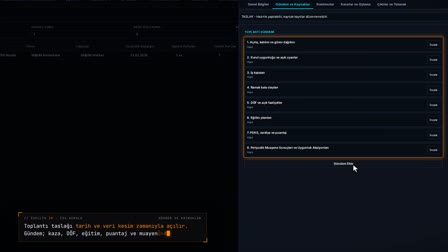
An appointment is created from the calendar row. A medical exam appointment notification reaches the employee's phone; a reminder notification template for upcoming exams is also defined.
Fitness decision, tests and work restrictions
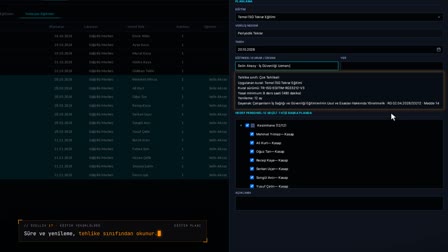
Audiometry, spirometry (SFT), chest X-ray, eye and laboratory tests are entered in the examination record. The result is recorded as Fit for Work, Conditionally Fit or Unfit (İşe Uygun, Şartlı Uygun, Uygun Değil), and restrictions such as night work, shift work, heavy lifting and working at height are selected.
A restriction becomes a work schedule warning
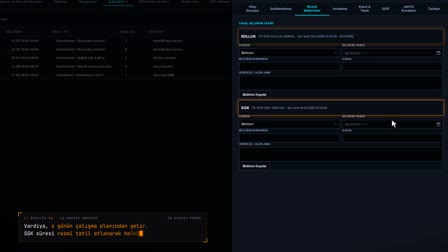
If a shift that does not suit the restricted employee is assigned, the work schedule does not block saving; it turns it into a legal warning and a notification goes to the relevant person. The HR action is processed in Fitness Actions (Uygunluk İşlemleri).
Health data is visible only to authorized users
The fitness decision, restrictions and examination attachments are visible only to users with the İSG Health Data (İSG Sağlık Verisi) permission. Only the latest examination warning appears on the personnel record card.
How it works
- In İSG › Examinations › Examination Calendar (İSG › Muayeneler › Muayene Takvimi), you see missing and upcoming medical examinations.
- You right-click the row and save the appointment with "Create Appointment" ("Randevu Oluştur"); a notification goes to the employee's phone.
- In New Examination Record (Yeni Muayene Kaydı), the physician enters the fitness result and, if needed, a work restriction, and saves.
- After a conditionally fit decision, an open action for HR is created in Fitness Actions (Uygunluk İşlemleri).
- If an unsuitable shift is assigned to an employee with a restriction, the Work Schedule (Çalışma Planı) shows a legal violation warning; HR closes the action.
Frequently asked questions
How to spot employees without a pre-hire medical exam?
In the Examination Calendar (Muayene Takvimi), a row is created automatically for each employee without a pre-employment examination; it appears as missing or overdue, together with the remaining days.
Does the physician's "no night work" restriction block the work schedule?
Saving isn't blocked; when a shift that counts as night work is assigned, the "Legal Warnings" ("Yasal Uyarılar") panel opens in the Work Schedule (Çalışma Planı) and a warning sign appears in the cell.
What does HR do after a conditionally fit decision?
In Fitness Actions (Uygunluk İşlemleri), HR right-clicks the open action, selects "Action Taken" ("İşlem Yapıldı"), enters the action type and a description, and closes the action.
How to track periodic medical exam intervals?
A single active periodic cycle is kept for each employee, and the next examination date is written in the record; the calendar shows Overdue, Due Soon and Normal statuses.
How to see employees who have no pre-hire exam?
In the Examination Calendar (Muayene Takvimi), employees without a pre-employment medical examination are automatically listed as missing.
What does a conditionally fit report mean?
In Pulsar, a Conditionally Fit (Şartlı Uygun) result means the person can work with certain restrictions; the restrictions (for example, no night work) are selected in the record and appear as warnings in the work schedule.
How does a physician's no-night-work decision appear in the schedule?
When a night shift is assigned to a restricted person, a warning sign appears in the cell, the violation is listed in the Legal Warnings (Yasal Uyarılar) panel and a notification is sent.
Are tests such as audiometry and spirometry (SFT) recorded?
Yes. Audiometry, spirometry (SFT), chest X-ray, eye and laboratory tests are entered in the examination record.
Who can see occupational health records?
The fitness decision, restrictions and attachments are visible only to users with the İSG Health Data (İSG Sağlık Verisi) permission.
How does employee medical surveillance work in Pulsar?
Pre-hire and periodic exams are tracked in the Examination Calendar (Muayene Takvimi), and the next exam date is written on the record. The physician's fitness decision and work restrictions are entered on the exam record; a restriction appears as a warning in the work schedule.