Employee offboarding checklist: an exit is not a date, it is a checklist.
Every open record, before the exit.
The screens in this film were recorded from the Turkish interface of Pulsar HRM.
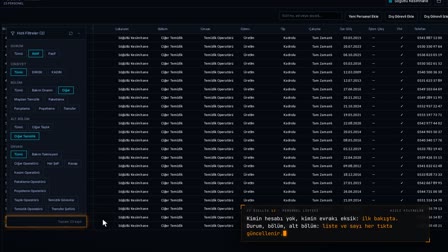
Employee Risk Analysis: pre-exit risk check in the offboarding process
Before someone leaves, debt, leave, asset assignment, PPE, workwear, document, İSG and access checks are previewed on one screen, each row with its data source. When the exit date is entered, a warning about an open enforcement file appears. Once the exit is saved, critical notifications and an exit risk form marked RISK (RİSK VAR) are created automatically.
Pre-exit debt check: wage garnishment and financial risks
When the risk analysis opens, the person's garnishment status, enforcement office, file and remaining balance appear in the Financial Risks (Finansal Riskler) section. Summary badges show the number of critical findings and items awaiting review.
Employee assets history: returning assets, PPE and workwear before exit
The devices assigned to the person and PPE and workwear handovers are listed in a single table. What must be returned before departure becomes clear.
Document compliance and exit check for İSG committee members
Document and compliance status and membership in the İSG committee or employee representation are shown. For an active committee member, the card notes that a change is required on exit.
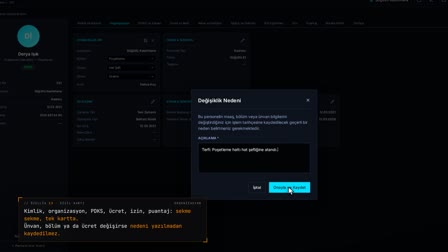
Recording the exit: garnishment warning, risk form and critical alert
When the exit date and reason are entered on the card, a confirmation window appears for an open garnishment debt; the exit risk assessment form is created as a PDF and critical notifications go to HR. For each active enforcement file, a reminder to notify the enforcement office is set.
Offboarding software automation: access, payroll relationship and BES close automatically
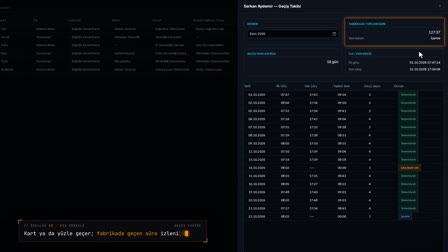
Recording the exit closes access in the same transaction and deactivates the mobile account. The payroll employment relationship ends on the exit date, and an open BES (Turkish private pension auto-enrolment) profile is closed from the following day.
How it works
- In Personnel Management (Personel Yönetimi), you right-click the row of the person who is leaving and select "Employee Risk Analysis" ("Personel Risk Analizi").
- Financial risks, asset assignments and handovers, documents and İSG records are listed on one screen with status, details and data source.
- You go back to the Personnel Record Card (Sicil Kartı), enter the exit date and the reason for leaving on the Contract (Sözleşme) card and save.
- If there is an open enforcement file, a warning appears; you confirm the exit with "Yes, Complete the Exit" ("Evet, Çıkış İşlemini Tamamla").
- Critical notifications are created; from the notification, "Open Form" ("Formu Aç") shows you the Exit Risk Assessment Form (İşten Çıkış Risk Değerlendirme Formu).
Frequently asked questions
What does the employee offboarding checklist check before exit?
Checks such as debts and wage garnishments, leave, asset assignments, PPE, workwear, documents, İSG committee membership and the Pulsar mobile/PIN account; each row shows the status, details and data source.
Is the exit form prepared by hand after the exit is recorded?
No. When the exit is saved, critical notifications and the Exit Risk Assessment Form (İşten Çıkış Risk Değerlendirme Formu), which shows the risk status, are created automatically.
When is a leaving employee's mobile access closed?
Access is closed in the same operation as the exit record; that is why the mobile account appears as inactive on the exit form.
What are the steps in the employee offboarding process?
In Pulsar, the tasks are listed in the risk analysis: wage garnishment and debt, asset assignment, PPE, workwear, document and İSG committee membership checks. Once the exit record is entered, tasks and notifications are created automatically.
How to create an employee offboarding checklist?
The list is not prepared by hand; Employee Risk Analysis (Personel Risk Analizi) builds it for each person with check, status, detail and data source columns, and it is exported to the exit risk form PDF.
What to do when an employee with a wage garnishment leaves?
When the exit is saved, an open garnishment debt warning appears, and for each active enforcement file a reminder to notify the enforcement office is set on the calendar; if the exit is reversed, the reminder is deleted.
What happens to BES on termination?
An open BES (private pension auto-enrollment) profile is closed automatically from the day after the exit; an error does not stop the exit and is written to the record.
How to get the exit risk form?
After the exit record is saved, Open Form (Formu Aç) in the system notification opens the Employee Exit Risk Assessment Form (İşten Çıkış Risk Değerlendirme Formu) as a PDF.
What happens to system access after an employee leaves?
With the exit record, access is closed in the same operation and the mobile account is deactivated.