Employee management system: an employee's whole record on one card, from hire to exit.
Identity, organization, PDKS, pay, leave and timesheet information sits tab by tab on the Personnel Record Card (Sicil Kartı). If the job title, department or pay changes, it cannot be saved without a reason; the history keeps the old value, the new value and the reason together. Processes from disciplinary action to appointment run from within the card.
On the personnel list, whose documents are missing and who has no account is visible at a glance. Before an employee leaves, debt, leave, asset assignment, PPE, document and access checks are previewed on one screen. Consultants, day laborers and outsourced service staff are tracked in a separate record with their own assignment periods.
Employee Records and Personnel File Management — Features: 4 · Short films: 4
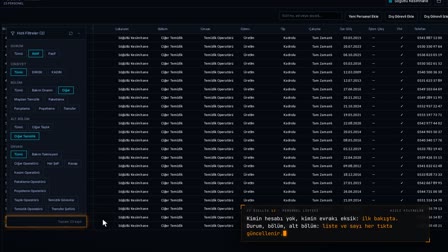 Feature 12 · 0:52
Personnel List
Find, filter, export; bulk uploads are checked first
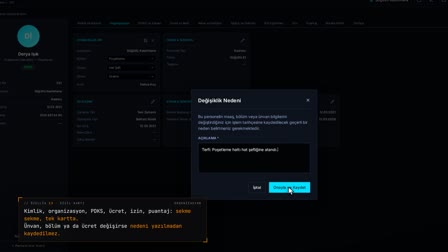 Feature 13 · 0:55
Personnel Record Card
Identity, processes, documents: all on one card
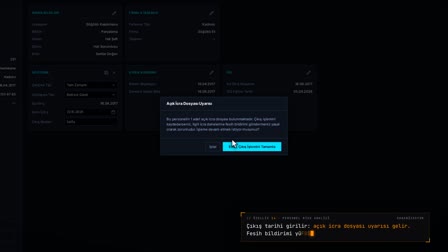 Feature 14 · 0:54
Employee Risk Analysis
Every open record, before the exit
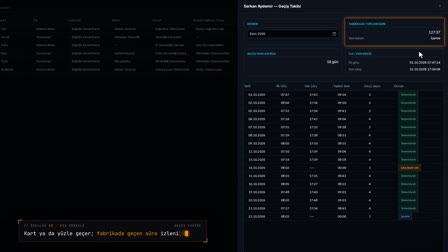 Feature 15 · 0:51
External Workers
Same turnstile, separate ledger: tracking limited to the assignment period
Employee records: created manually, from Excel or from ERP
Employees are created manually, with an Excel template or from the ERP; in the same transaction, a system user with the employee role is set up for each new person, and if the user cannot be created, the employee record is not created either. The Excel file is checked first and then uploaded; retirement and disability columns are ready in the template.
Personnel record card: the digital personnel file on one screen
On the personnel record card, the identity, organization, documents, PDKS, pay, address, emergency contact, assigned assets, İSG (occupational health and safety) training, leave, timesheet, payroll profile, events and history tabs sit side by side. Personnel documents are created from templates or uploaded from the card; every field change on the card is listed in the history.
New hire onboarding workflow: task, notification and onboarding form
When a new employee is created, a calendar task due two days after the hire date is assigned to the location, and a critical notification goes to HR roles. Size, leave group, shuttle stop, work pattern and overtime / working-time balancing consent are completed in a single onboarding form; the sizes entered are written to pending PPE and workwear requests.
Offboarding automation: payroll, BES and garnishment reminder handled automatically
When an exit date is entered on the card, exit tasks are scheduled and the payroll employment relationship closes on the exit date; if the exit is undone, the relationship reopens. An open BES (private pension auto-enrollment) profile is closed from the day after the exit, and for a person with an active wage garnishment file, a reminder to notify the enforcement office is set per file.
Tracking retired and disabled employees
The card holds the pension type, status, pension allocation number, first insurance date and SGDP (social security support premium) choice; SGDP cannot be selected outside the conditions, and changes are written to the history. The disability rate, GİB (Turkish Revenue Administration) approval date and report end date are also on the card; if the approval date is empty, a warning shows that the deduction will not be applied.
Life events: marriage, birth, pregnancy and death
From the Records and Processes (Kayıtlar ve Süreçler) menu, 14 types of status records and a bereavement submenu are entered; marriage or divorce is recorded with a document, and marital status and marriage date are written to the card. A pregnancy is closed with a birth document, the nursing period is tracked, and the leave entitlement for periodic checkups during pregnancy opens automatically; event documents are stored with a record number and encrypted.
Employee list filtered like Excel, exported to Excel
On the employee list, people without an account and people with missing documents are visible at a glance. Each column is filtered with multi-select as in Excel and narrowed with the date and department tree; the list is exported as Excel, PDF or CSV or sent by email, and the column layout is saved per user.
Incident reports, defence statements and disciplinary process from the card
Absence, late arrival and early departure events are recorded from PDKS, the supervisor's phone or the personnel record card. The incident report is printed from a template with real data, a defense request is created and the defense is received with a wet signature; the disciplinary decision is formally notified to the employee on mobile.
Topics in Personnel Management
Frequently asked questions
Can employees be bulk imported from Excel into the employee management software?
Yes. The employee Excel template is downloaded and the file is first validated with Check (Kontrol Et); new, to-be-updated and faulty rows are counted separately, and then the file is uploaded. Retirement and disability columns are in the template.
How to prepare a personnel file?
Article 75 of Turkish Labor Law No. 4857 (İş Kanunu) requires the employer to keep a personnel file for each worker. In Pulsar, you define once which documents are required of everyone and which only of certain departments and job titles; for a new employee record, these documents are ready, printed in a single output, and the signed copy is attached to the record.
What is a digital or electronic personnel file?
In Pulsar, the digital personnel file is the Documents (Belge ve Evraklar) section of the personnel record card: documents produced by Pulsar and documents received from outside sit in the same place with status labels. Event documents such as marriage and birth are stored with a record number and encrypted.
How are onboarding documents tracked in the software?
The company decides which documents are required; each document is marked as standard for everyone or optional by department and job title. On the new employee's card, the documents matching the rule and the missing ones are ready, and employees with missing documents can also be filtered on the employee list.
How to onboard a new employee?
Employees are created manually, with Excel or from the ERP, and a system user is set up in the same transaction. An onboarding task and a critical notification go to HR; size, leave group, shuttle stop, work pattern and overtime consent are completed on the onboarding form.
What is the employee offboarding process?
Before the exit, the Employee Risk Analysis (Personel Risk Analizi) shows debt, wage garnishment, assigned asset, PPE, document and İSG (occupational health and safety) checks on one screen. When an exit date is entered on the card, exit tasks are scheduled, the payroll employment relationship and BES profile close, and if there is a garnishment file, a reminder is set.
How is a working retiree recorded on the personnel record card?
The card holds the pension type, status, pension allocation number, first insurance date and SGDP (social security support premium) choice. SGDP cannot be selected for a person who does not meet the conditions, and every change is written to the history.
Which data is kept on the card for the disabled employee tax allowance?
The disability rate, GİB (Turkish Revenue Administration) approval date and report end date are kept on the card. If the GİB approval date is empty, a warning shows that the deduction will not be applied.
Can employees see their own data on their phone?
Yes. Employees activate the mobile app with a code and PIN; they see their leave balance, timesheet, work schedule, assigned assets and PPE on their phone.
What does HR management software for employee tracking cover?
Within Pulsar HRM's HR software, employee tracking covers the personnel record card and digital personnel file, onboarding and offboarding, retirement and disability data, life events, the employee list, and the incident report, defence statement and disciplinary process. Consultants, day labourers and outsourced service staff are tracked in a separate record with their own assignment periods.
Let's talk about Pulsar HRM and your own processes.
Start with PDKS; add the field and enterprise layers as you need them.