Document management system: design the template once, print documents with real data.
One document template is marked standard for everyone, another optional only for certain departments and job titles. On a new employee's personnel record card, the documents matching the rule are ready and print in a single printout with personal details filled in; the signed copy is attached to the same record.
A template revision is opened from the published version and previewed with a real record, and the KYS / ISO revision number advances automatically. Time-limited documents such as insurance policies open as drafts from the asset record, and their expiry day lands on the calendar.
Document Management System and Digital HR Document Management — Features: 3 · Short films: 3
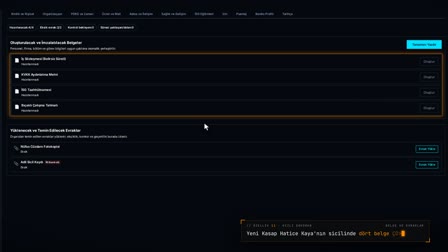 Feature 11 · 0:49
Quick Document
Standard and optional document rules, signature-ready documents in the personnel record
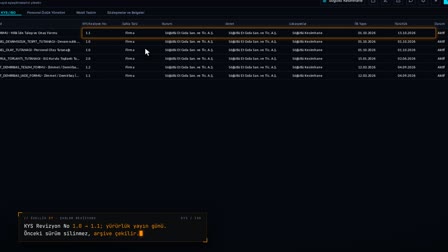 Feature 37 · 0:50
Template Revision
Revision, preview with real data and the KYS/ISO number in one flow
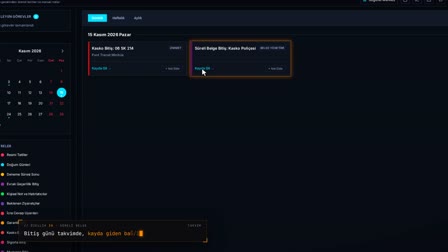 Feature 38 · 0:54
Time-Limited Document
From the asset to the policy draft, to the expiry day on the calendar
Form builder and template management: TipTap editor and data fields
Templates are designed in the browser editor with text, tables and data fields; the page you see in the editor is identical in the PDF. Data fields are searched and inserted, and a three-party signature block is placed with a single click.
Quality document management: draft, publish, archive and document revision control
A template goes through a draft, published and archived cycle; the published version does not change, and Start Revision (Revizyon Başlat) opens a new draft from the published version. The draft is previewed with a real record, a PDF is produced from the same view and published, and the KYS / ISO revision number advances automatically.
Location-based template management: source template and location copy
The system template is the source; with Activate at Locations (Lokasyonlarda aktif et), a location copy goes live, and no documents are produced from an inactive copy. A long document printed without opening the screen is split into pages on the server.
Ready-made system templates and contract generation: reports and forms
Employment contracts, asset / fixture handover and return forms, the PPE handover form, İSG (occupational health and safety) committee, training, accident and CAPA documents, the visitor badge and the exit notification letter to the enforcement office come as system templates. Each template works with its active copy at the location, and the document is printed with the record's real data.
HR document automation: standard and optional rules for personnel files
One document is marked as standard for everyone, another as optional only for certain departments and job titles. On a new employee's personnel record card, the documents matching the rule are ready; all of them are printed in a single output with the person's details filled in, and once the signed copy is uploaded, the document is not regenerated.
Document expiry reminders: contracts, external documents and time-limited records
External documents are stored encrypted with a record number. When comprehensive and compulsory traffic insurance expiry dates are entered on a vehicle record, policy drafts open in Contracts and Documents (Sözleşmeler ve Belgeler); a completed document cannot be changed and its expiry date lands in the calendar as a reminder.
Mobile HR document app: delivery tracking, read and understood, explicit consent
Contracts, the KVKK (Turkish personal data protection law) privacy notice, İSG instruction notices and job descriptions are sent to the employee as mobile deliveries, and the employee opens the document and responds with I Have Read and Understood (Okudum, Anladım). Only the employee gives the KVKK explicit consent statement; the response channel and responder are recorded, and the document goes into the personnel file.
Letterhead documents: letterhead profiles for companies and subcontractors
A letterhead profile is defined for companies and subcontractors with the official name, address, tax details, document code prefix and logo. In the KYS (quality management system) record a template is matched with a letterhead profile, and the document is printed with this header.
Frequently asked questions
What is a document management system?
A document management system is software in which document templates, their versions and the documents produced are managed in one place. In Pulsar, a template moves from draft to published and from published to archived, and documents are printed with real record data.
How does document revision control work?
On a published template, Start Revision (Revizyon Başlat) opens a new draft; the change is checked with a real-data preview, and a PDF is produced from the same view and published. The previous version moves to the archive.
How is a revision number assigned in QMS document control?
When a template linked to KYS is published, the KYS revision number advances automatically (for example, from 1.0 to 1.1) and the effective date is written.
Can an employment contract be generated automatically from a template?
Yes. Employment contract templates come as system templates; the document is produced from the personnel record card, filled in with the employee's details, and can be sent to the employee by mobile delivery.
Is the on-screen preview identical to the printed PDF?
Yes. The page you see in the editor is identical in the PDF; publishing happens once the PDF produced from the same view as the real-data preview is verified.
Can documents be delivered to employees via mobile?
Yes. A document is sent as a mobile delivery only from a template that has an active copy at the location; the employee's response is stored with the channel and responder information.
How to track insurance policy expiry dates?
When the comprehensive and compulsory insurance expiry dates are entered on the vehicle card, draft policies open; the document is completed, and its expiry date is added to the calendar as an event.
How to obtain an employee's overtime consent?
In Pulsar, overtime and working-time balancing consent is completed per employee on the onboarding form. The consent is part of the onboarding step; no separate paper is circulated.
Let's talk about Pulsar HRM and your own processes.
Start with PDKS; add the field and enterprise layers as you need them.