Kaizen management: from a note in the suggestion box to management's decision file.
Employees write improvement suggestions on their phones; a suggestion lands in the department supervisor's pre-approval queue, and missing information is asked for in the same record. After the first approval it moves to a senior manager and a decision support report is prepared; the person who made the decision and the person who recorded it are shown separately.
End of probation, contract and policy expiries, public holidays and expected visitors come to the calendar from their own records. Notes are linked to the relevant record, and a support request starts with information about the screen it was opened from.
Kaizen Suggestion System, Calendar and Internal Support — Features: 4 · Short films: 4
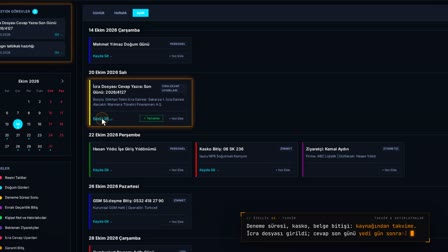 Feature 43 · 0:50
Calendar
Enforcement response deadline, policy, document, holiday: all to the calendar from their records
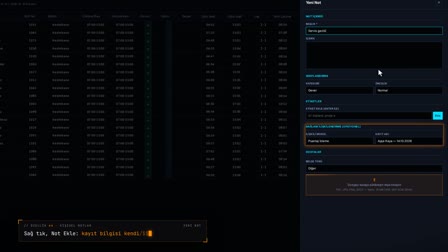 Feature 44 · 0:49
Personal Notes
Right-click, Add Note: the note is linked to the record, its attachment stored encrypted
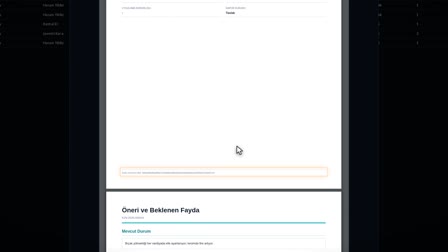 Feature 45 · 0:56
Kaizen
Pre-approval, additional information, report and management decision in one record
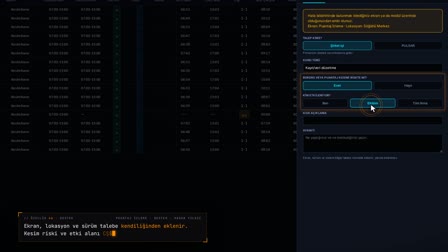 Feature 46 · 0:50
Support
Explain the problem once: its screen, location and place in the queue are in the request
Digital suggestion box: ideas arrive from the phone with a photo
Employees submit improvement suggestions with a photo from their phone; on the web, a manager can enter one on the employee's behalf. The same suggestion is not saved twice, and iPhone photos are converted to JPEG on the device.
Idea management software: automatic routing and pre-approval
Without anyone having to chase it, the suggestion lands with the department supervisor, then with the local HR manager or the local manager. The department supervisor sends the suggestion to preliminary assessment, rejects it or requests more information; more information can be requested at any stage.
Suggestion evaluation: kaizen assessment and duplicate check
Assessment uses impact and feasibility criteria; the outcome is given as keep on record, not found suitable, out of scope, duplicate or submit to the authorized decision-maker. For a duplicate decision, all records from the same location are listed as candidates.
Kaizen approval workflow: management decision and decision support report (PDF)
The decision-maker is selected from a list; the suggestion is approved, added to the implementation plan, rejected or sent back for revision. The management decision support report is generated as a PDF and emailed from the workflow drawer.
Kaizen app: notifications to the submitter and My Kaizens
Every assessment and decision is notified to the suggestion owner. Employees follow their own suggestions on mobile in the My Kaizens (Kaizenlerim) screen and answer requests for more information there.
Kaizen report: counters, waiting days, Excel and PDF
Counters match the list filter, and the waiting days at each stage are visible. The list is exported to Excel or PDF; every export is logged and protected against Excel formula injection.
HR notes app: personal notes linked to records, encrypted attachments
A note belongs only to its owner; it is linked to a personnel, asset assignment, leave, PPE, application or timesheet record from that record's own screen. Notes are tracked with draft, active, completed and archived statuses, and PDF, JPG, PNG and DOCX attachments are stored encrypted.
Support ticket system: tickets open with their screen and reach the right desk
The life-ring icon in the title bar starts a request with the name of the screen it was opened from; the request is routed to the in-house support contact or to PULSAR. The company support officer sees pending requests, answers them or forwards them to PULSAR, and the requester follows the status from My Requests (Taleplerim).
Frequently asked questions
What is kaizen?
Kaizen is an approach to improving work through small, continuous improvements. In Pulsar, every employee suggestion opens as a record, lands with the person responsible, is assessed and closes with its decision.
How to fill in a kaizen form?
On the phone, the Kaizen / Improvement (Kaizen / İyileştirme) card is opened under Requests (Talepler); a title, category and description are entered, up to three photos are added, and Submit Suggestion (Öneri Gönder) is tapped.
How to evaluate a kaizen suggestion?
The department supervisor gives pre-approval, the assessor records the outcome using impact and feasibility criteria, and management makes the decision. Each step is notified to the suggestion owner.
How to set up an online suggestion box and employee suggestion system?
Setting up a suggestion box in Pulsar requires no separate workflow: a suggestion lands with the department supervisor automatically, then moves on to the local HR manager or the local manager.
How to prepare a kaizen report?
When the preliminary assessment is complete, the management decision support report is created as a draft and its version increments with the decision; the report is viewed as a PDF and sent by email.
What happens if the same suggestion is submitted again?
The assessor gives a duplicate decision; for this, all records from the same location appear in the candidate list.
How does the submitter learn the outcome?
Every assessment and decision goes to the suggestion owner as a notification; employees see the status of their suggestion on mobile in My Kaizens (Kaizenlerim).
Can others see personal notes?
No. A note belongs only to its owner; access to someone else's note is refused on the server. If audit logging is enabled, events are written without their content.
How to open a support ticket?
Click the life-ring icon in the title bar and enter who the request is for (in-house or PULSAR), the topic type, the scope of impact and a description. A request number is assigned and the request is tracked in My Requests (Taleplerim).
Let's talk about Pulsar HRM and your own processes.
Start with PDKS; add the field and enterprise layers as you need them.