Shuttle scheduling straight from the work schedule: who, when, in which vehicle
Approved overtime, effective capacity, correction request.
The screens in this film were recorded from the Turkish interface of Pulsar HRM.
Shuttle Plan: employee shuttle planning
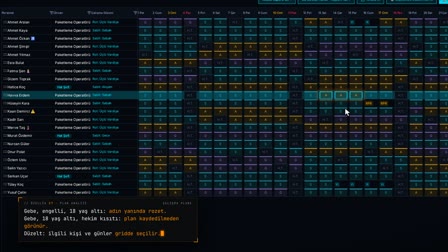
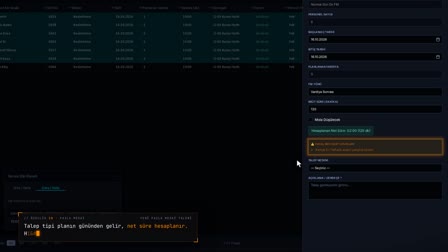
The shuttle plan is derived from the work schedule; it isn't prepared separately. Pending overtime shows only as an impact; once approved, it is applied to the shuttle times. A group that exceeds effective capacity is marked "Correction required" ("Düzeltme gerekli"); a correction request opened from the row stays in the history with its outcome note.
Employee commute planning without a separate shuttle plan
The passenger list comes from the work schedule of the selected day; the shuttle measurement counts arriving and departing people according to the shift windows at the gate. When the schedule changes, the measurement changes too.
X-Ray: shuttle occupancy analysis with seven indicators
Arrivals, departures, vehicles needed, empty seats, seat usage, directional imbalance and monthly cost are measured for the selected day; clicking an indicator opens the formula and the records contributing the most.
Shuttle after overtime: approved overtime counts, pending is optional
In the shuttle measurement, the shuttle times of approved overtime are the basis. When the "Include pending OT" ("Bekleyen FM dahil") option in X-Ray (Röntgen) is turned on, the shuttle times of overtime awaiting approval are used; how the evening shuttle will change can be seen before approval.
Shuttle Impact Panel for shift based transport planning in overtime and schedules
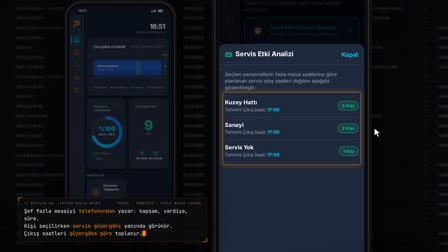
While the overtime plan and the work schedule are being entered, the draggable Shuttle Impact Panel (Servis Etki Paneli) previews the arrival/departure distribution by route.
Shuttle risk days: missing vehicle trips on the horizon strip
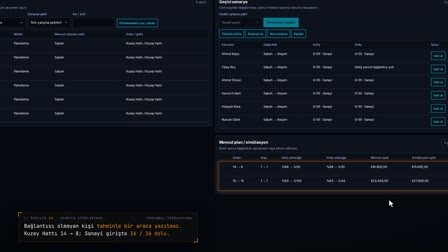
Over a horizon of at least 15 days, days when vehicle trips fall short due to leave, sick leave or employees starting work appear as risk days.
How it works
- In Shuttle Planning › Shuttle Status (Servis Planlama › Servis Durumu), you see inbound and outbound shuttles with their occupancy by route and time.
- On plan rows, pending overtime is shown only as an impact, with the pending shuttle time.
- Overtime is approved in Overtime Management (FM Yönetimi); when you click Refresh (Yenile) in Shuttle Planning (Servis Planlama), approved overtime is applied to the shuttle time.
- A row where the group headcount exceeds the effective number of seats becomes "Correction required" ("Düzeltme gerekli"); you open a request from the row with "Request correction" ("Düzeltme iste").
- In the "Correction requests" ("Düzeltme talepleri") list, you resolve the request with an outcome note; the record stays in the history.
Frequently asked questions
Do you need a separate plan for shuttle scheduling?
No. The shuttle plan is derived from the work schedule, overtime, and stop and route assignments. When the work schedule is up to date, the shuttle plan is calculated from it.
Does overtime awaiting approval change the shuttle time?
No. Pending overtime appears on the row only as an impact, with the pending time. Once the overtime is approved, it is applied to the employee's shuttle time.
How to calculate shuttle capacity, and what happens if it is exceeded?
Effective capacity is found by applying the occupancy rate in the shuttle policy to the vehicle's number of seats. If the group headcount exceeds it, the row becomes "Correction required" ("Düzeltme gerekli"); the correction request that is opened is sent to the authorized users.
Is pending overtime included in shuttle occupancy?
Optionally. Approved overtime is the basis of the measurement; when "Include pending OT" ("Bekleyen FM dahil") is selected in X-Ray (Röntgen), the shuttle times of overtime awaiting approval are also used.
How to measure shuttle occupancy?
X-Ray (Röntgen) shows seat usage and empty seats for each shift window of the selected day; below the indicator, the formula and the records contributing the most open up.
Can you see the shuttle impact while entering overtime?
Yes. The Shuttle Impact Panel (Servis Etki Paneli) on the Overtime (Fazla Mesai) screen shows the impact of the overtime plan on the arrival/departure distribution and routes.
What is a risk day in employee transport?
In Pulsar HRM, a risk day is a day on the horizon strip when vehicle trips fall short because employees are on leave, on sick leave or about to start work.
How to calculate the number of shuttle vehicles?
X-Ray (Röntgen) measures the vehicle trips needed in that day's windows; vehicle planning sizes the capacity class × count for each route based on the busiest day.