The asset handover form is not a separate task; it is the handover itself.
Bulk asset assignment, handover form, mobile declaration and signed copy.
The screens in this film were recorded from the Turkish interface of Pulsar HRM.
Asset Handover: asset assignment and equipment checkout form
A laptop, phone and access card from the warehouse are assigned in a single transaction. The Asset / Fixture Handover Form (Zimmet / Demirbaş Teslim Formu) opens automatically and is saved to mDYS. On their phone, the employee uses "Select Missing from List" ("Listeden Eksik Seç") to report an item they did not receive. Movement History (Hareket Geçmişi) shows the mobile response, the read receipt and the report; the signed copy is uploaded.
Bulk asset assignment to employees: stored devices in one step
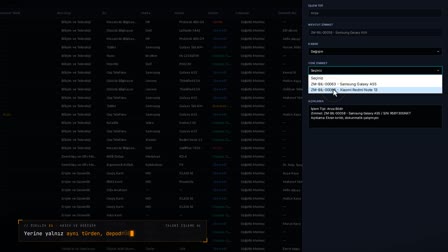
On the Assets (Varlıklar) screen, working devices in the warehouse are selected and assigned to an active employee in a single operation with Assign Asset (Zimmet Ver). Only active employees appear in the employee search.
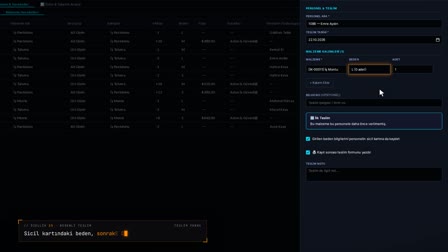
The asset / equipment checkout form opens automatically
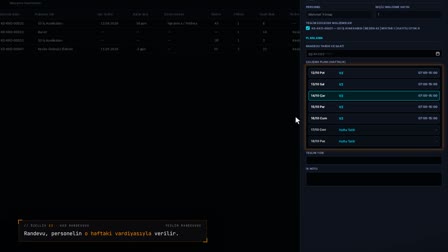
The handover form opens with the assignment details, items and signature fields. The record language is selected as Turkish, English, German, Arabic or Russian, previewed live and created as a PDF.
Employee asset tracking: item-by-item confirmation on the phone
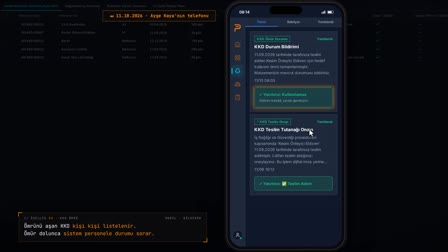
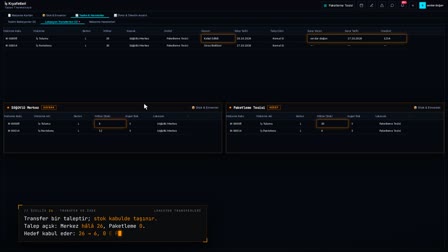
A mandatory notification reaches the employee's phone; they confirm receipt or report a missing item with an explanation. The response and the time it was read are written to the movement history.
Signed asset handover form archive: the copy is stored encrypted
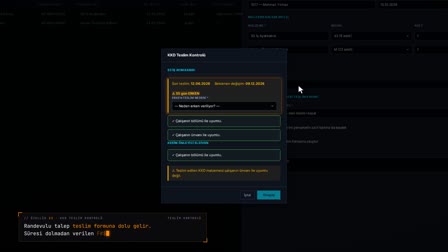
The signed record is uploaded as PDF, JPG or PNG with drag and drop, encrypted and saved to document management. A signed copy can also be uploaded for scrap and lost / stolen transactions.
How it works
- In Asset Management (Varlık Yönetimi), you filter the assets in the warehouse and select the items to hand over together.
- You right-click, choose "Assign Asset" ("Zimmet Ver"), search for the employee, write a handover note and assign all items in a single step.
- The Asset / Fixture Handover Form (Zimmet / Demirbaş Teslim Formu) opens automatically; you generate it with a live preview and save it to mDYS.
- The employee responds from the notification on their phone and reports any item they did not receive with "Select Missing from List" ("Listeden Eksik Seç").
- In Movement History (Hareket Geçmişi), you see the mobile response and read status, and upload the signed copy with a right-click.
Frequently asked questions
Can several assets be assigned to an employee at once?
Yes. Assets in the same location and warehouse are selected together and assigned in one step; the handover form includes all items.
Does an employee's missing-item report change the asset status?
No. The report is recorded with device, IP and time, but the system does not update the asset status automatically; the decision rests with the authorized user.
How to upload a signed asset handover form?
In Movement History (Hareket Geçmişi), you right-click the row and choose "Upload Signed Copy" ("İmzalı Suret Yükle"); the PDF, JPG or PNG file is encrypted and saved to mDYS v2.
How to create an asset handover form?
The moment an asset is assigned, the handover form opens automatically; the items and employee details arrive pre-filled, and the form is created as a PDF and printed.
What goes into a company property agreement form?
The form in Pulsar contains the document number and revision, handover and employee details, the assets handed over, the declaration text and the signature table.
How to create a laptop agreement form for employees?
A laptop, phone or access card is assigned in the same step and listed item by item on one handover form. Company phone tracking happens in Asset Management (Varlık Yönetimi) and Movement History (Hareket Geçmişi), just like other assets.
How do employees report a missing item?
In the asset assignment notification on the phone, Report Missing Item (Eksik Teslim Bildirimi) is selected and an explanation is written; the response appears in the movement history.
How is a signed asset handover form stored?
The signed copy is uploaded from the row, encrypted and saved to document management, and it opens from the movement history.
Can the asset handover form be prepared in English?
Yes. The record language can be set to Turkish, English, German, Arabic or Russian.