Personal notes: the note doesn't stay on paper, it sits next to the record.
Right-click, Add Note: the note is linked to the record, its attachment stored encrypted.
The screens in this film were recorded from the Turkish interface of Pulsar HRM.
Personal Notes: notes linked to records
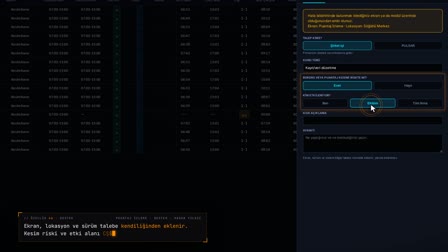
Right-click a timesheet row and choose Add Note (Not Ekle); the note opens with the record details filled in. A category, priority and tag are selected; an attached file is stored encrypted with AES-256-GCM. The note stays as a marker on the timesheet row and opens in the Linked Records (Bağlı Kayıtlar) drawer; it is closed with a status note in My Personal Notes (Kişisel Notlarım).
Add employee notes from the record's row
When you right-click a timesheet row and select Add Note (Not Ekle), the note opens pre-filled with the related module and record information. A note is linked to an employee, asset assignment, leave, leave balance, PPE, workwear, application or timesheet record; the link opens the relevant screen.
Notes with attachments: files are stored encrypted
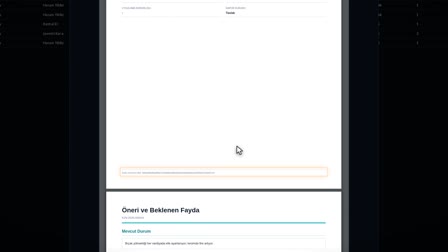
PDF, JPG, PNG and DOCX files of up to 10 MB are attached. The type is checked by the content signature, and each attachment is encrypted with a permanent key.
HR notes app: status, task notes and critical notes
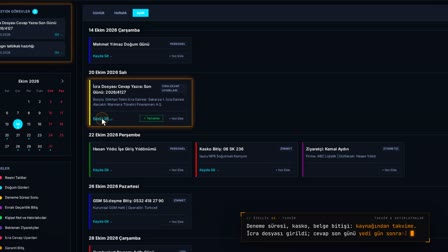
In My Personal Notes (Kişisel Notlarım), notes are listed with the statuses draft, active, completed and archive; total, active, open task and open critical counters are shown. The notes archive works through status: Change Status moves a note one step from draft to active, to completed and to archive, with an optional note on each change. You can switch between list and card view.
Employee notes software: each note belongs only to its owner
Access to someone else's note is rejected on the server; the list returns only the user's own notes. Deletion is soft, and a deleted note can be restored.
Notes linked to records appear on the record's screen
A user's own notes linked to a record appear on the personnel record card, the leave form, the leave balance and the candidate drawer. Clicking the link in the note opens the screen of the related record.
How it works
- In Timesheet Monitoring (Puantaj İzleme), you right-click a row and choose "📎 Add Note" ("📎 Not Ekle"); the note opens with the related module and record name filled in.
- You write the title and content and select a category, priority and tag.
- You drag the document into the Files area and press "Save" ("Kaydet") once the upload is complete.
- A note marker appears next to the employee's name on the timesheet row; clicking it opens the note in the "Linked Records" ("Bağlı Kayıtlar") drawer.
- In My Personal Notes (Kişisel Notlarım), you right-click the note and use "Change Status" ("Durum Değiştir") to move it to Completed, with an optional status note.
Frequently asked questions
Which files can you attach to notes?
The file area works with the rule "PDF, JPG, PNG, DOCX — Max. 10 MB (AES-256-GCM Encrypted)". Attached files are stored encrypted with AES-256-GCM.
How does a note show which record it is linked to?
A note is linked to the Context Linking (Bağlam İlişkilendirme) field with the module and record name of the record it was opened from. It appears as a marker on the timesheet row, and the card shows the related module and record link.
Where can I track all my notes in one place?
From the My Personal Notes (Kişisel Notlarım) shortcut in the header. Notes are tracked in list or card view with search, a filter panel and statistics chips; status changes are recorded with a status note.
Is it safe to keep notes on employees?
In Pulsar, a note belongs only to its owner, anyone else's access is rejected on the server and file attachments are encrypted. If the company enables the audit log, events are written without their content.
Can you add attachments to notes?
Yes. PDF, JPG, PNG and DOCX files of up to 10 MB are attached by drag and drop and stored encrypted.
How to link a note to a record?
On the record's own screen, right-click and select Add Note (Not Ekle); the related module and record name arrive pre-filled.
Can a deleted note be restored?
Yes. Deletion is soft; a deleted note opens read-only and can be restored.
Can notes be exported?
The note list is exported as CSV.
How to track task notes and critical notes?
The counters in My Personal Notes (Kişisel Notlarım) separately count open tasks and open critical notes; when a note is marked as completed, it drops off the counter.
Do you need a separate notes app for work or a digital manager notebook?
Not in Pulsar: personal notes are kept inside Pulsar; a note is linked to a timesheet, employee, leave, asset assignment or application record and tracked from the My Personal Notes (Kişisel Notlarım) shortcut in the header.