Hiring software: from application to interview score, from org chart to permissions.
When an application is added to the pool, the candidate's previous applications at the same company and any former employee record are listed automatically; no application is accepted under the same identity as an active employee. For interviews, pay, experience and shift targets are defined once, each answer is checked against its target and candidates are ranked on the score table.
When the employee Excel file is uploaded, department, job title and position records are created and the organization chart arranges itself. The standard headcount plan is counted from actual employees and the work schedule. Roles grant permissions; exceptions have an end time. Locations go from address to map, and the site boundary and entry point are drawn.
Recruitment, Org Chart and Permission Management — Features: 6 · Short films: 6
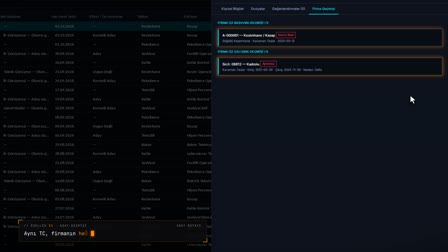 Feature 31 · 0:51
Candidate History
Active employee block, in-company history, assessment report
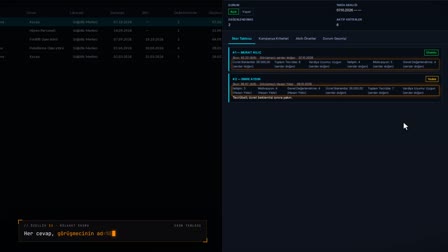 Feature 32 · 0:49
Interview Score
Campaign targets, live fit check, score table, reserve candidate
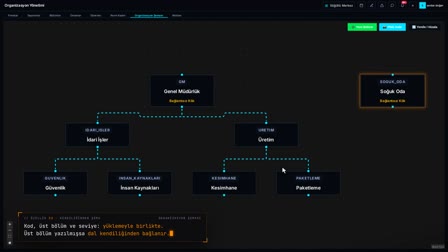 Feature 33 · 0:52
Self-Building Chart
Departments, job titles and positions from Excel; drag-and-connect chart
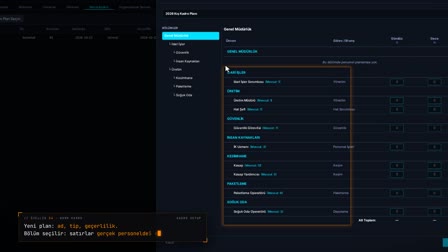 Feature 34 · 0:51
Standard Headcount
Rows from employees, current staff from the work schedule
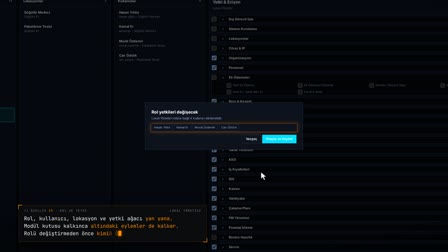 Feature 35 · 0:52
Roles and Permissions
Role changes are approved with the affected users in view; exceptions are granted with an end date
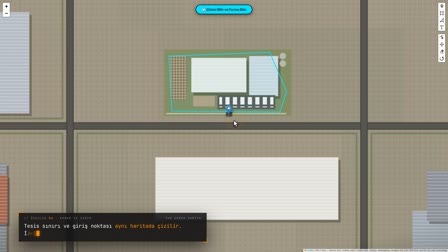 Feature 36 · 0:56
Location and Boundary
Center coordinates from the map, notifications from within 200 meters
Hiring pipeline: application, screening, interview, decision
An application enters the pool, and pre-screening is done with preliminary review tags. HR, technical, general manager or other interviews are recorded with date, interviewer, notes and result; the candidate is moved to Candidate, Hired or Final Rejection status, and a final rejection requires a reason.
Recruiting software for recruiters: pool, interviews and reports on one screen
The recruiter adds the application to the pool and moves the candidate to preliminary review, an interview or an assessment from the row's right-click menu. The assessment report and CV are emailed to the manager from the same screen.
Talent pool, candidate database and resume database in one list
All applications are listed newest first in a paged grid, with columns for last interview, experience, files and number of interviews. Each candidate is given a candidate number in the A-000001 format; CVs, reference letters and certificates are stored encrypted, and their integrity is verified with SHA-256.
Applicant tracking system: previous applications and former employee records appear automatically
Applications made with the same Turkish ID number (TC) at the company's other locations, and any former employee record with its employee number and reason for leaving, are listed automatically. A new application cannot be opened with an active employee's TC; every creation, edit and status change on a candidate is stored in the history with its old and new values.
Interview evaluation form and interview scorecard
An interview campaign is opened for a target department and position, and company targets are entered once. Information questions such as salary expectation, experience, shift fit, military service, foreign languages, driver's license and references are compared live against the target; communication, motivation and overall assessment are scored 1–5, and candidates are ranked by a score out of 100.
Group interview campaigns, ad hoc interviews and closing a campaign
Campaigns are listed with Open, Closed and Canceled statuses and the department tree; an ad hoc interview can also be held for a single candidate without opening a campaign. A campaign is closed for reasons such as candidate found in the pool, position closed or budget frozen, and can be reopened if needed.
Blue-collar hiring: factory and production staff, high-volume recruitment
The application channel is marked as Walk-in or Referral, and the application class is linked to a department and position (for example, cutting room, butcher). Questions such as shift fit, driver's license and start date are compared against the target; candidates for the same position are gathered in a single interview campaign and ranked by score.
Recruitment reporting: assessment report as PDF and Excel export
The candidate's personal and application information, company history and interviews are gathered into a single PDF report, and the report is emailed together with the CV to people selected from the address book. The application list is exported as Excel, PDF or CSV.
Org chart software and department hierarchy
Companies of the parent company, holding, group company and region types are linked to a parent company; departments are kept with a unique code within the location, a parent department, a cost center and a hazard class. If a department, job title or position written in the employee Excel file does not exist, it is created, and the organization chart is drawn automatically from these records and downloaded as PNG.
Headcount planning and staffing level analysis
In a seasonal, annual or custom standard headcount plan, the actual employees of departments and sub-departments come in with their current counts, and the target headcount (FTE) is entered for each shift. The plan is sent for approval, and an approved plan is updated through a revision; the comparison shows planned, current, fill percentage and shortfall by position.
Subcontractor tracking: contracts, staff list and work area limits
A subcontractor company is defined with its SGK (Social Security Institution) transaction number, authorized person and contracts; the locations and departments where it may work are restricted by hazard class and NACE code, and workers cannot be employed outside the selected departments. Active staff linked to the subcontractor are listed, and a shared account card is kept for leasing and supply.
Role permission management, field privacy and approval matrix
In Role Permissions V2 (Rol Yetki V2), roles, users, locations and the module, tab and action tree are edited side by side; users can be given additional permissions or restrictions with an end time. Fields such as pay, IBAN and TC are hidden or masked by role; the approval matrix defines multi-step approval templates by department, job title, position and shift.
Topics in Recruitment and Organization
Frequently asked questions
How does the HR recruitment process work?
In Pulsar, an application enters the pool, is screened with a preliminary review tag, and interviews and interview assessments are recorded. In the end, the candidate is moved to Hired or to Final Rejection with a reason; every step remains in the candidate history.
What is a talent pool?
A talent pool is the record in which all applications to the company are kept in a single list. In Pulsar, each application sits in this pool with its candidate number, channel, application class, number of interviews and files.
How to build a CV database?
When an application is saved, the CV is uploaded by dragging it onto the same form; reference letters and certificates are also added to the candidate's files. Files are stored encrypted and open in a PDF preview without leaving the page.
What is an applicant tracking system (ATS)?
An applicant tracking system is software that tracks applications, interviews and the hiring decision per candidate. In Pulsar, the candidate's previous applications at the company and any former employee record are added automatically.
How to create an interview evaluation form?
When the campaign is opened, the questions to ask and the company targets (pay, experience, shift) are selected once. The interviewer enters each answer next to its target, scores the scored questions 1–5 and records the decision as Positive, Negative, Reserve or On Hold.
How to score an interview?
Scored questions are rated from 1 to 5, and each information question that meets the target counts as full points; the total is converted to a score out of 100. The Score Table (Skor Tablosu) ranks the candidates and shows, next to each answer, the name of the interviewer who entered it.
Can candidates fill in the job application form themselves?
No. In Pulsar, HR records the application; where the application came from is marked as the Online, Walk-in, Referral, Career Site or Other channel.
What happens when a former employee applies again?
Company History (Firma Geçmişi) in Candidate Details (Aday Detayı) shows the former employee record with the employee number and reason for leaving. If the person is still an active employee, the application cannot be opened.
How to create an org chart?
The employee Excel file is uploaded with department, parent department, job title and position columns; missing records are created and the chart is drawn automatically as a tree from the department records. Links are corrected by dragging, and the chart is downloaded as PNG.
How to calculate headcount for workforce planning?
When a department is selected, the plan brings in job title and position rows from actual employees, and the target headcount is entered for each shift. The comparison measures this target against current employees with assigned shifts and calculates fill and shortfall.
How to track subcontractor staff?
A subcontractor company is registered with its SGK transaction number and contracts, and its linked active staff are listed separately. The locations and departments where the subcontractor may work are restricted, and workers cannot be employed outside these limits.
Let's talk about Pulsar HRM and your own processes.
Start with PDKS; add the field and enterprise layers as you need them.