PDKS timesheet software: from clock-in and clock-out records to a payroll-ready timesheet
Pulsar HRM starts with PDKS but doesn't stop there. A clock-in or clock-out record says nothing on its own; Pulsar evaluates it together with that day's work schedule, the leave record and the employee's own response. The timesheet becomes more than a sum of hours: a result whose causes you can see.
In Timesheet Monitoring (Puantaj İzleme), click a name and the whole month opens. Anomalies are filtered out of thousands of records in two clicks, and the on-screen table is exported to Excel as is. Before sending to payroll, each employee's entire month is validated; errors are corrected in the timesheet, not in payroll, and the period is locked.
PDKS and Timesheet Software — Features: 5 · Short films: 5
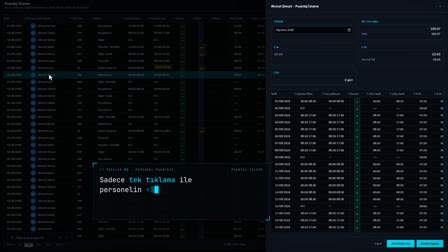 Feature 01 · 0:25
Employee Timesheet
Monthly timesheet and payroll data in one click
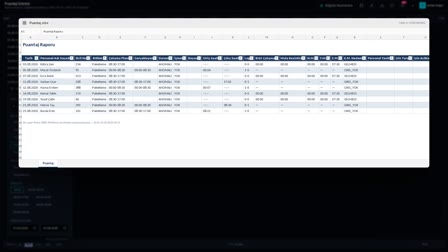 Features 02–03 · 0:30
Quick Filter and Report What You See
Filter in two clicks, export what's on screen to Excel
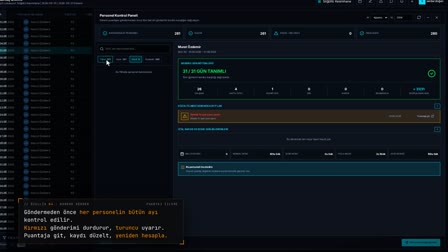 Feature 04 · 0:38
Send to Payroll
No data goes to payroll until 31/31 days are validated
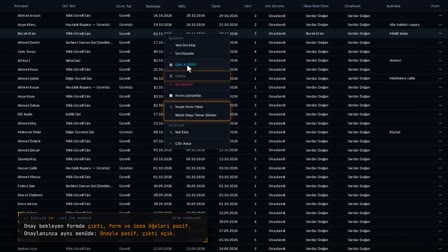 Feature 10 · 0:50
Right-Click Menu
Items whose conditions aren't met are disabled or not listed at all
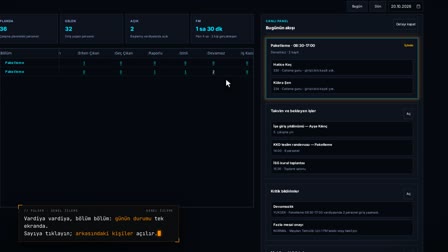 Pulsar · 0:53
General Overview
The whole day on one screen, the screen tailored to each user
What is PDKS? How the Pulsar HRM employee attendance software works
PDKS is a personnel attendance control system: it records who arrives at and leaves work, and when. In Pulsar HRM, every clock-in or clock-out record that reaches the system automatically starts that day's timesheet calculation; the record is evaluated together with that day's work schedule, shift and leave. When needed, the timekeeper enters a raw clock-in or clock-out record manually.
Clock in clock out tracking, manual punch entry and correction
In Timesheet Monitoring (Puantaj İzleme), each row's raw clock-in and clock-out records can be opened; a missing clock-in or clock-out is added manually, an incorrect record is deactivated rather than deleted, and the day is recalculated. On a day worked differently from the schedule, the actual shift is selected by comparison. Long work that runs past midnight is split across two timesheet days.
Absence tracking, late arrival tracking and early departure report
The daily timesheet row shows late arrival and early departure as missing time (E.M.) and time beyond the shift as overtime (F.M.). The day of an employee who did not show up is confirmed as absent, or the confirmation is withdrawn; a scheduler also scans for absent days. A small E.M. or F.M. difference is closed with a quick tolerance, which is preserved on recalculation.
Timesheet management: filter, correct, export to Excel
The Timesheet Monitoring (Puantaj İzleme) grid is filtered by period, department, shift, calculation status and employee search; the department column has a hierarchical tree filter and the date column a date tree filter. Right-clicking a row opens the actions that fit that row's status. The on-screen table is exported to Excel with its visible columns.
Working-time balancing: making up and closing missing hours
Missing time on a row can be offset against that day's overtime, and the action can be undone. Overtime is transferred to the working-time balancing pool, or used from the pool against missing time; the pool balance, conversion rate and borrowing limit are visible during the action. On a day linked to hourly leave, missing time is closed by the leave.
From PDKS to payroll: automatic timesheet calculation and period close
For each employee-day, shift detection, breaks, rounding, normal time, missing time, overtime types and night work are calculated. At period end, the pre-check lists pending leave and night-work restriction findings; the Send to Payroll (Bordro Gönder) panel validates each employee's month, the timesheet is sent and the period is locked.
Attendance device management, connection test and IP whitelist
Time clock terminals are defined per location with a code, type (RFID, card, fingerprint, face, QR, mobile), direction, IP and port, brand, model, firmware and purpose (main gate, break, cafeteria, visitor). A device is set to active, idle, faulty or out of inventory, with a status history kept; connection diagnostics test the last signal, ping response and TCP port. The IP addresses and ranges allowed to access a location are defined separately.
Multi-location PDKS and branch-based attendance
Locations are defined with a code, type, country, address, time zone, language, hazard class and NACE code; the address is found on the map and the site boundary is drawn. All time screens use the location's time zone; from the top menu, the user selects a single location, a company or all locations as the scope.
Subcontractor and external staff punches kept out of the timesheet
The raw passes of a person registered as an external worker are not transferred to the timesheet. Their daily first entry, last exit and total time are tracked for information only in External Worker Monitoring (Dış Görevli İzle).
Frequently asked questions
What is PDKS and how does a time and attendance system work?
PDKS (personnel attendance control system) records clock-in and clock-out times. In Pulsar HRM, every clock-in or clock-out record that reaches the system triggers that day's timesheet calculation; the record is evaluated together with the work schedule, shift and leave.
How to edit time punches when an employee forgets to clock in?
In Timesheet Monitoring (Puantaj İzleme), the missing clock-in or clock-out is added manually from the row's Clock-In/Out Records (Giriş Çıkış Kayıtları) drawer, and the day is recalculated. An incorrect record is not deleted; it is deactivated.
How to track employee attendance and keep a timesheet?
The timesheet is calculated automatically; the timekeeper checks the daily rows in Timesheet Monitoring (Puantaj İzleme). Anomalies, absences and missing time are filtered out, and a problem row is corrected from the right-click menu and recalculated.
How to record an absence?
On the row of an employee who did not show up, right-click and select "Confirm Absence" ("Devamsız Onayla"); if all the selected rows have the No-show (Gelmedi) status, the action applies to several rows at once. The confirmation can be withdrawn when needed.
How does working-time balancing work?
On a timesheet row, missing time is offset against the same day's overtime, or overtime is transferred to the working-time balancing pool and later used against missing time. The pool balance, conversion rate and borrowing limit are shown during the action; balancing rules are defined in the leave policy.
How to track late arrivals?
Late arrival is calculated as missing time on the timesheet row and appears in the E.M. (missing time) column. Late arrivals are filtered with column filters and exported to Excel; small differences can be closed with a quick tolerance.
Who keeps the timesheet for subcontractor workers?
In Pulsar HRM, the passes of people registered as external workers are not transferred to the timesheet. Their daily first entry, last exit and total time are tracked for information only in External Worker Monitoring (Dış Görevli İzle).
How to transfer attendance data to payroll?
At period end, the Send to Payroll (Bordro Gönder) panel validates each employee's entire month; red findings stop the submission. When the timesheet is sent, the period is locked, and every change after submission is recorded as before/after.
How to check the connection of an attendance terminal?
In Device and IP Management (Cihaz ve IP Yönetimi), connection diagnostics test the device's last signal, ping response, TCP port connection and database status. The device's active, idle, faulty or out-of-inventory status is recorded together with its reason.
How to manage employee attendance across multiple locations?
Each branch or workplace is defined as a separate location with its own country, address and time zone. From the top menu, the user selects a single location, a company or all locations as the scope; timesheet, device and list screens are filtered by this scope, and times are shown in the location's time zone.
How to get a report of employees who did not come to work?
In Timesheet Monitoring (Puantaj İzleme), the absence filter lists the rows of employees who did not come to work. The table on screen is exported to Excel with its visible columns.
Is Pulsar HRM a web-based time and attendance system?
Yes. Pulsar HRM is web-based time and attendance and timesheet software: the timesheet, leave and approval screens open in the browser. Employees follow their clock-in/clock-out records, leave balance and requests in the mobile app.
Let's talk about Pulsar HRM and your own processes.
Start with PDKS; add the field and enterprise layers as you need them.