Document expiry tracking: register the vehicle and the policy file opens automatically.
From the asset to the policy draft, to the expiry day on the calendar.
The screens in this film were recorded from the Turkish interface of Pulsar HRM.
Time-Limited Document: insurance policy and time-limited document tracking
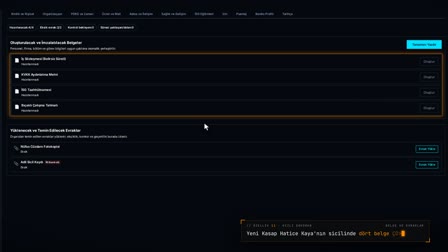
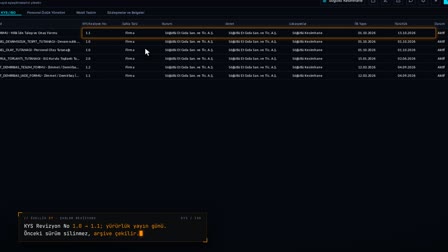
When the comprehensive and compulsory traffic insurance expiry dates are entered on the asset card, two policy drafts open automatically in Contracts and Documents (Sözleşmeler ve Belgeler). The expiry date in the draft comes from the Assets (Varlık) module and cannot be changed. A policy with a missing file or missing required fields cannot be completed; a completed record is locked. The expiry day appears on the calendar with a link to the record.
Fleet vehicle record: comprehensive and insurance expiry dates
In the vehicle details of the asset card, the license plate, current mileage, fuel, HGS / OGS (toll payment tag), comprehensive insurance, insurance and inspection expiry dates are entered. These columns appear in the grid.
Insurance tracking: comprehensive and traffic policy drafts open automatically
When the vehicle is saved, Comprehensive Insurance Policy (Kasko Poliçesi) and Traffic Insurance (Trafik Sigortası) drafts open in Contracts and Documents (Sözleşmeler ve Belgeler) with the expiry date and the related asset. The drafts are linked by the related asset's name and code, and the expiry date comes from the asset record.
Completing the draft: mandatory fields and the policy file
The document number, issuer, counterparty, amount and currency are entered, and the policy PDF is uploaded. If a mandatory field is missing, Complete (Tamamla) shows a warning.
Completed documents are locked; the expiry date goes to the calendar
A completed document record cannot be changed. The expiry date opens calendar events both as a comprehensive insurance expiry and as a time-limited document expiry.
How it works
- In Asset Management (Varlık Yönetimi), you open the vehicle's card and enter the license plate and the Comprehensive Insurance Expiry (Kasko Bitiş) and Insurance Expiry (Sigorta Bitiş) dates in Vehicle Details (Araç Detayları), then save.
- In Contracts and Documents (Sözleşmeler ve Belgeler), two drafts open automatically: one for the Comprehensive Insurance Policy (Kasko Poliçesi) and one for Traffic Insurance (Trafik Sigortası).
- In the draft, the end date comes from the Assets module and is locked; you add the document number, issuer, institution and policy file.
- When you click "Complete" ("Tamamla"), any missing required fields are listed; once you enter the amount and currency and confirm, the record is completed.
- The expiry day appears in Calendar & Reminders (Takvim & Hatırlatmalar) with a "Go to Record →" ("Kayda Git →") link.
Frequently asked questions
When are vehicle policy drafts created?
When a vehicle record is added or updated, drafts open for comprehensive insurance and traffic insurance. If there is already a completed record with the same end date, no new draft opens.
Can a completed document record be edited later?
No. Before completion, you are asked to confirm "A completed document record cannot be changed." ("Tamamlanan belge kaydı değiştirilemez."); once completed, the record cannot be changed.
How does a policy end date appear in the calendar?
In the calendar, the "Comprehensive Insurance Expiry" ("Kasko Bitiş") card comes directly from the asset record, and the "Fixed-Term Document Expiry" ("Süreli Belge Bitiş") card comes from the Contracts and Documents (Sözleşmeler ve Belgeler) record. The cards appear on the expiry day with a "Go to Record →" ("Kayda Git →") link.
How to track a comprehensive vehicle insurance expiry date?
The comprehensive insurance (kasko) expiry is entered on the vehicle card; a policy draft is opened and the expiry date appears on the calendar as an event.
Is there a document expiry reminder before the end date?
The expiry date appears on the calendar as an event; from the calendar entry you go to the related document.
Can a completed document be changed?
No. Once a document record is completed, it cannot be changed.
Is the vehicle inspection expiry recorded?
Yes. In the vehicle details, the inspection expiry date is kept together with the comprehensive insurance and insurance expiry dates.
Where is the policy file uploaded?
While editing the draft in Contracts and Documents (Sözleşmeler ve Belgeler), the policy PDF is dragged into the Document File (Belge Dosyası) field.
Can a document be completed with missing information?
No. If mandatory fields such as amount and currency are empty, the system states which fields are missing.
Which vehicle details are kept for company fleet records?
The Vehicle Details of the asset card hold the plate, current mileage, fuel type, HGS / OGS toll tag, and the comprehensive insurance, insurance and inspection expiry dates; periodic mileage entries are also recorded. The comprehensive and insurance expiry dates open policy drafts, and the comprehensive insurance expiry also goes to the calendar.