Employee profile: an employee's whole story on one personnel record card.
Identity, processes, documents: all on one card.
The screens in this film were recorded from the Turkish interface of Pulsar HRM.
Personnel Record Card: employee profile and employee change history
Identity, organization, PDKS, pay, leave and timesheet, tab by tab on one card. If the job title, department or pay changes, it cannot be saved without a reason; History (Tarihçe) keeps the old value, the new value and the reason together. Processes from disciplinary action to termination and from appointment to life events live inside the card. Documents are prepared in one click, and the employee reads and approves them on their phone. The moment a pregnancy record is entered, the night-shift ban is applied.
Electronic personnel file: the record card tabs
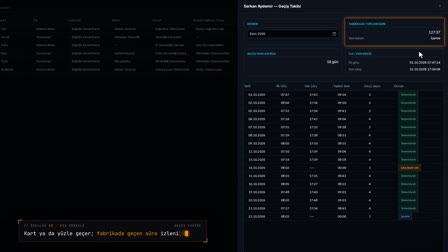
Identity, organization, documents, PDKS, pay, address, the employee emergency contact, assigned assets, İSG trainings, leave, timesheet, payroll profile, events and history sit tab by tab on one card. The Records and Processes (Kayıtlar ve Süreçler) grid filters event files and leave status records in a single list.
Change reason and employee change history
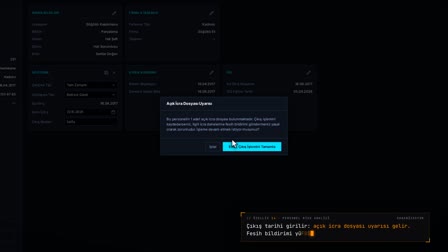
When a critical field such as job title changes, the Reason for Change (Değişiklik Nedeni) window asks for the reason and effective date. History stores the old value, the new value and the reason together.
Marriage, pregnancy and other employee life events in HR
Marital status is not changed by hand on the card; it is processed with a document through a marriage / divorce event in Records and Processes (Kayıtlar ve Süreçler). A pregnancy is added with the estimated due date and closed with a birth certificate, the nursing period is tracked and the periodic checkup leave entitlement opens.
Documents, mobile delivery and document acknowledgement tracking
Documents generated by Pulsar and documents received from outside are listed separately on the card. The document goes to the employee's phone and is confirmed with Read and Understood (Okudum, Anladım); the mobile delivery history shows when the document was viewed and answered.
Pay card, payroll profile, employee dependents information and İSG
Pay and pay type (gross / net) are shown on the card; a change is written to the payroll profile as a new dated version. Child records, İSG (occupational health and safety) training history, the pre-employment medical examination and active work restrictions are also on the card.
How it works
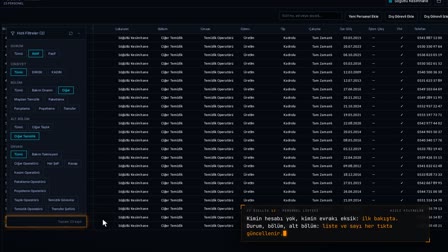
- In Personnel Management (Personel Yönetimi), you right-click the employee's row and open the Personnel Record Card (Sicil Kartı).
- You see the person's information by switching between tabs such as Organization (Organizasyon), PDKS and Time (PDKS ve Zaman), and Pay and Finance (Ücret ve Mali).
- When you change a critical field such as the job title and save, you enter the reason in the "Reason for Change" ("Değişiklik Nedeni") window that opens.
- You record events such as disciplinary action, termination, appointment or marriage from the "Records and Processes" ("Kayıtlar ve Süreçler") menu.
- You prepare documents from Documents (Belge ve Evraklar); the employee reads them on their phone and confirms with "I have read and understood" ("Okudum, Anladım").
Frequently asked questions
Does the record card keep an employee change history?
Yes. For each change, History (Tarihçe) keeps the field, the old value, the new value and the reason entered for the change together.
Why can't marital status be changed directly on the record card?
The Marital Status (Medeni Hal) field is locked on the card; the change is made through a Marriage / Divorce (Evlilik / Boşanma) event record in the "Records and Processes" ("Kayıtlar ve Süreçler") menu.
Is the night shift restriction applied once a pregnancy is recorded?
When a pregnancy record is added on the Health and Development (Sağlık ve Gelişim) tab, the card shows the warning "Night shift ban applied (4857/74)." ("Gece vardiyası yasağı uygulanıyor (4857/74).") and the ban is enforced.
How to fill in an employee profile?
The card is created when the employee is added; fields are edited tab by tab with the pencil icon, and a reason for change is required for critical fields. Event-driven fields such as marital status are processed through Records and Processes (Kayıtlar ve Süreçler).
What is an employee record card?
The record card holds an employee's identity, role, pay, leave, timesheet and document information in one place; in Pulsar's employee record management every change is written to the history with its reason.
How to track the employee change history?
The History (Tarihçe) tab lists the changed field, the old and new values and the reason for the change.
How to record a marriage on the employee profile?
The marriage / divorce event is entered with a document; marital status and the marriage date are written to the card automatically, and the document goes into the encrypted archive.
How to record a pregnancy for pregnant employee tracking?
Under Health and Development (Sağlık ve Gelişim), Add Pregnancy (Gebelik Ekle) is used to enter the estimated due date and the document date; the pregnancy is closed with a birth certificate, and miscarriage or cancellation and the nursing period are also tracked.
How is periodic check-up leave granted to a pregnant employee?
When a pregnancy record is added, the periodic checkup leave entitlement opens automatically and is deactivated when the pregnancy ends.
Why can't pay information be changed on the card?
If the ERP is used as the master source, the pay, SGK workplace, company and subcontractor fields change only from the ERP and are read-only on the card.
What does pregnant employee tracking cover?
A pregnancy record opens with the expected delivery date and closes with the birth certificate; miscarriage or cancellation and the breastfeeding period are also tracked. Once the record is entered, the night shift ban is applied and the right to periodic check-up leave opens.