A faulty device arrives as a request and closes with a return, a new asset assignment and two forms.
From a mobile fault request to return, debt record and new asset assignment.
The screens in this film were recorded from the Turkish interface of Pulsar HRM.
Fault and Replacement: faulty assigned device and replacement
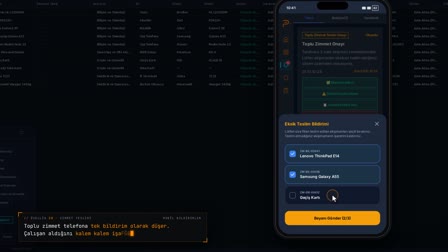
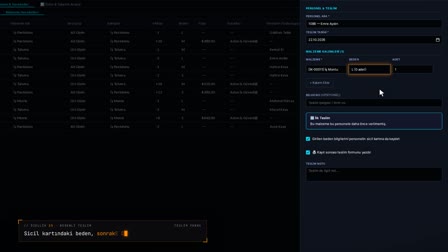
The employee selects the faulty device on their phone and reports the fault. While the request is open, no direct action can be taken on the asset. HR takes up the request and selects "Replacement" ("Değişim"); the new assignment list contains only devices of the same type that are in the warehouse. A debt record is prompted; once the return report is saved, the handover form for the new assignment opens automatically.
Equipment request app: report a faulty assigned device by phone
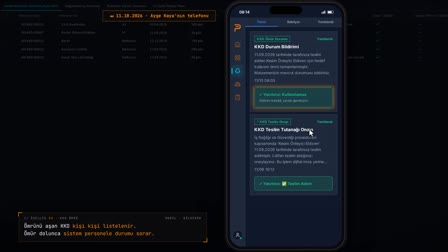
The employee selects their faulty device in My Assets (Zimmetlerim) and opens a request with Report Fault (Arıza Bildir). The request appears on the web in the Employee Request (Personel Talebi) column.
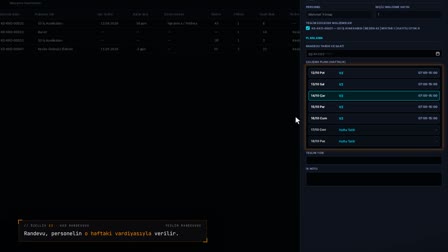
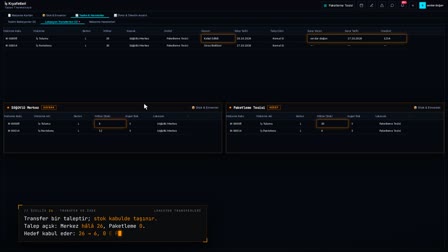
Employee asset tracking: the record locks while a request is open
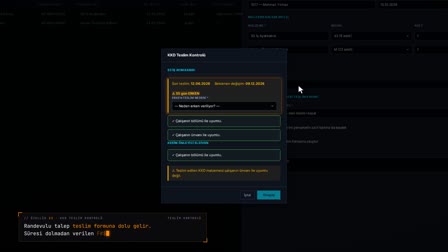
No direct action can be taken on the asset until the open mobile request is resolved. The request is taken up, given an appointment or rejected.
Asset check in check out: take back, mark as faulty or replace
In Process Request (Talebi İşleme Al), the decision is either Take Back and Record as Faulty (İade Al ve Arızalı Kaydet) or Replacement (Değişim). For a replacement, a device of the same type from the warehouse is selected.
Employee debt record: asset / damage compensation
An employee debt record is prompted during the return. If yes is selected, an internal company debt of the asset / damage compensation type is opened, and the deduction and installment rules are entered.
Return form and new handover form
First, the return record is created and saved to document management; then the asset / fixture handover form for the new device opens automatically. The movement history shows both transactions.
How it works
- On the My Assets (Zimmetlerim) screen on their phone, the employee chooses "Report Fault" ("Arıza Bildir"), marks the device and sends the request.
- In Asset Management (Varlık Yönetimi), the request appears in the Employee Request (Personel Talebi) column; while the request is open, no direct action can be taken on the asset.
- You right-click to open "Process Request" ("Talebi İşleme Al"), then choose "Replacement" ("Değişim") as the decision and a new device from the warehouse.
- The return is made with "Receive Return and Open Form" ("İade Al ve Formu Aç"); you are asked about a debt record and can open an internal debt record if you wish.
- You save the Return Record (İade Tutanağı) to mDYS; the handover form for the new assignment then opens automatically.
Frequently asked questions
Can a faulty device be replaced with a different type of device?
In a replacement decision, the new assignment list includes only assets that are the same type as the current device and are in the warehouse.
Can the device record be changed while a fault report is open?
No. No direct action can be taken until the open mobile asset request is resolved; the request can be processed, linked to an appointment or rejected.
Can a debt record be opened for an employee for device damage?
Yes. You are asked about a debt record during the return; if you confirm, an internal debt record opens with the employee already filled in and is linked to the asset assignment movement.
How to prepare an equipment return form?
When the asset is returned, the Return Record (İade Tutanağı) drawer opens; Create and Save to MDYS (Oluştur ve MDYS'ye Kaydet) saves the record to document management.
What to do when an assigned device breaks down?
The employee reports the fault from their phone; HR takes up the request and either takes the device back and records it as faulty or replaces it.
Can a debt record be opened if assigned equipment is damaged?
Yes. With the Employee Debt Record (Personel Borç Kaydı) prompt during the return, an internal company debt of the asset / damage compensation type is opened; deduction rules are set in the debt record.
How to submit an asset request in the equipment request app?
In the mobile app, the relevant device is selected under My Assets (Zimmetlerim) and the request form is filled out; the request moves through the under review, awaiting handover, approved or rejected statuses.
Why can't the asset be changed while a request is open?
If a return or assignment is made directly on the asset before the open request is resolved, the request outcome is skipped; for this reason, the record is locked until the request is closed.
Can an appointment be set for an asset request?
Yes. A handover appointment is created with Schedule Appointment for Employee Request (Personel Talebine Randevu Ver) in the request menu.