A PPE request does not wait in a queue; it becomes an appointment that fits the shift.
Mobile request, appointment based on the weekly schedule, notification to the employee.
The screens in this film were recorded from the Turkish interface of Pulsar HRM.
PPE Appointment: PPE request and issuance appointment
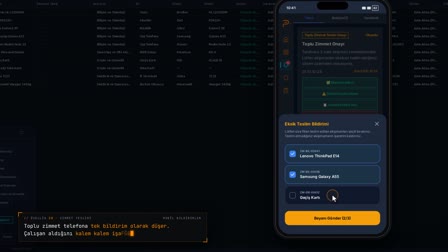
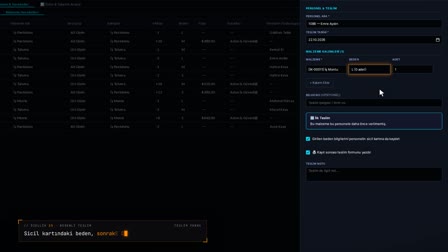
The employee opens a PPE request on their phone; because the usage period hasn't ended, the remaining days and the reason for the early request are asked. In Pending Handovers (Teslim Bekleyenler), HR sets an appointment while seeing the employee's work schedule for that week. When an appointment is set on a day the employee isn't working, a schedule warning appears. Once the appointment is saved, a notification reaches the employee's phone.
PPE app: requesting PPE from the phone in PPE tracking software
On the PPE tab, the employee uses Request PPE (KKD Talep Et) to select the main group, subgroup, item and size. The previous handover date and remaining days of use appear on the form.
PPE replacement tracking: early requests are not rejected, a reason is asked
For a request made before the usage period ends, a reason for the early request (for example, wear and tear) and an explanation are mandatory. The request appears on the open requests card as awaiting an appointment.
PPE issuance tracking: appointments based on the work schedule
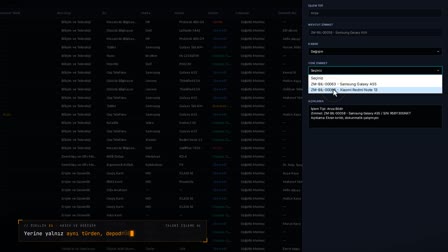
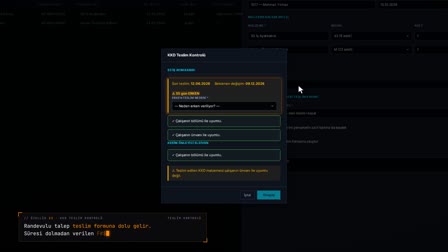
On the web, the Schedule Appointment (Randevu Ver) window in Pending Handovers (Teslim Bekleyenler) shows the employee's weekly work schedule; if the appointment is set at a time outside the schedule, an Appointment Schedule Warning (Randevu Plan Uyarısı) appears. The handover location and an HR note are entered.
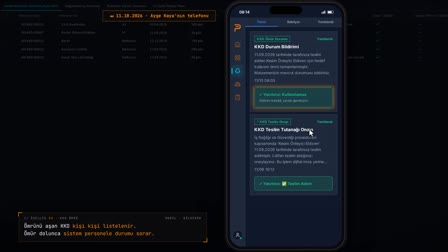
The appointment arrives on the phone
When the appointment is saved, a mandatory notification with the item, date and handover location reaches the employee's phone and is closed with Read (Okudum). Until the moment of handover, the request with an appointment stays in the Pending Handovers (Teslim Bekleyenler) list with the appointment time.
How it works
- On the PPE tab on their phone, the employee chooses "Request PPE" ("KKD Talep Et") and selects the main group, subgroup, item and size.
- The form shows the previous handover and the remaining period; if the period has not expired, a reason for the early request is selected and the request is sent.
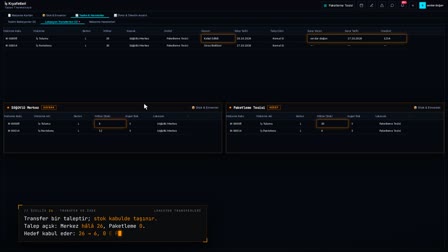
- HR sees the request, with its remaining period and early-request reason, under PPE › Handovers & Movements › Pending Handovers (KKD › Teslim & Hareketler › Teslim Bekleyenler).
- HR right-clicks to open "Schedule Appointment" ("Randevu Ver") and enters the date, time and handover location after checking the employee's weekly work schedule.
- Once the appointment is saved, a notification arrives on the employee's phone; the appointment and handover location appear on the open request card.
Frequently asked questions
Can PPE be requested before its service life ends?
Yes. The request is not rejected; if the period has not expired, an "Early Request Reason" ("Erken Talep Nedeni") is required, and the request cannot be sent until a reason is selected.
Can the employee's shift be seen when setting an appointment?
Yes. The Handover Appointment (Teslim Randevusu) screen shows the employee's work schedule for that week; scheduling an appointment on a day the employee does not work triggers an "Appointment Schedule Warning" ("Randevu Plan Uyarısı").
How do employees learn about their PPE issuance appointment?
Once the appointment is saved, a mandatory notification with the item, appointment date and handover location is sent to their phone.
How to submit a PPE request from the phone?
In the mobile app, Request PPE (KKD Talep Et) is selected on the PPE (KKD) tab; the main group, item, size and quantity are entered and the request is sent.
Can PPE be replaced before the end of its service life?
Yes. An early request is not rejected; a reason for the early request and an explanation are asked for, and the reason is recorded.
How to schedule a PPE issuance appointment?
In Pending Handovers (Teslim Bekleyenler), right-click the row and select Schedule Appointment (Randevu Ver); the date, time and handover location are entered while viewing the employee's shift.
What happens if the appointment falls outside the shift?
If the selected time does not match the work schedule, an Appointment Schedule Warning (Randevu Plan Uyarısı) appears; the user can cancel and choose a suitable time.
How often are safety shoes issued?
The company sets the interval with the service life policy on the item card; when the employee opens a request, the last handover date and the days remaining are shown.
How is the issuance location communicated to the employee?
The appointment notification includes the item name, appointment date and handover location, and reaches the phone as a mandatory notification.
How does gloves issue tracking and hard hat tracking work?
A hard hat, work gloves or safety shoes are defined on the material card with their service life. When the employee opens a request, the last issue date and remaining days are shown; a request made before the period ends asks for an early request reason.