The right-click menu is built around the status of the row you click
Items whose conditions aren't met are disabled or not listed at all.
The screens in this film were recorded from the Turkish interface of Pulsar HRM.
Right-Click Menu: quick actions on the timesheet screen
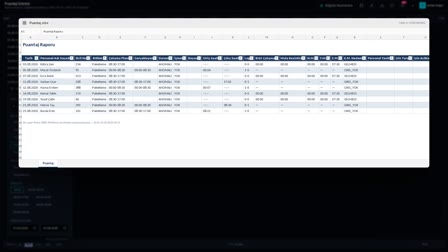
In Timesheet Monitoring (Puantaj İzleme), Confirm Absence (Devamsız Onayla) appears on the row of an employee who didn't show up and Add Tolerance (Tolerans Ekle) on the row of a late arrival; on a day linked to a leave form, only form actions remain in the menu. In Leave Forms (İzin Formları), the print, view and signature items of a form awaiting approval are disabled; once the form is approved, Approve (Onayla) is disabled in the same menu and these items become active. On the Personnel Record Card (Sicil Kartı), process actions sit in nested groups.
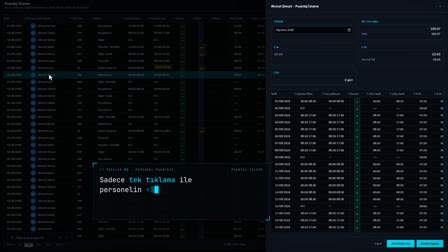
Missed punch correction: a menu built from the row's status
When you right-click a selected row in Timesheet Monitoring (Puantaj İzleme), the menu is built according to that row's status: on an anomaly row, clock-in/clock-out records, actual shift, leave/sick leave creation and recalculation appear together.
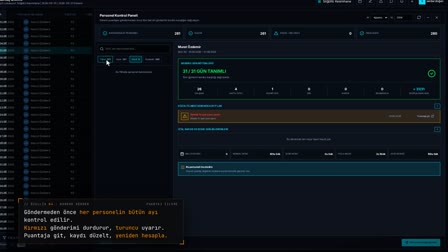
Confirm Absence: absence tracking for employees who did not show up
"Confirm Absence" ("Devamsız Onayla") appears on the row of an employee who did not show up; if all selected rows have the No-show (Gelmedi) status, the action is applied to all of them. The confirmation can be undone when needed.
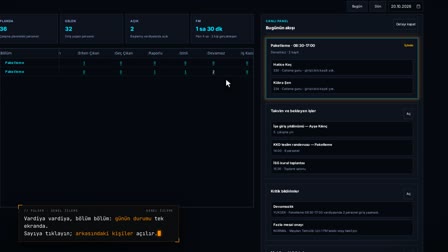
Add Tolerance: closing small late-arrival differences
"Add Tolerance" ("Tolerans Ekle") appears on a calculated row for someone who arrived late and has no overtime; a small E.M. (missing time) or F.M. (overtime) difference is closed, the last tolerance can be undone and it is preserved on recalculation.
Leave approval: print and signature actions that open by status
On a leave form awaiting approval, the print, view and signature items are inactive; once the form is approved with "Approve (Onayla)", these items open and "Approve" becomes inactive. Signed form upload is one of these items: the signed copy of the approved form is added with "Upload Signed Form (İmzalı Form Yükle)".
Nested process groups on the Personnel Record Card
In Records and Processes (Kayıtlar ve Süreçler), the right-click menu opens with nested Disciplinary, Termination, Organization and Personal / Health groups; Maternity / Birth, Pregnancy and Nursing Leave are listed for female employees, and Paternity for male employees.
How it works
- In Timesheet Monitoring (Puantaj İzleme), you select a row and right-click; the menu is built according to that row's status.
- "Confirm Absence" ("Devamsız Onayla") appears on the row of an employee who didn't show up, and "Add Tolerance" ("Tolerans Ekle") on the row of someone who arrived late and has no overtime.
- On a day linked to a leave form, only Action Details (İşlem Detayları), Add Note (Not Ekle) and Cancel Form (Formu İptal Et) remain in the menu.
- In Leave Forms (İzin Formları), you approve a form awaiting approval with "Approve" ("Onayla"); the print, view and signature items become active.
- On the Personnel Record Card › Records and Processes (Sicil Kartı › Kayıtlar ve Süreçler), you right-click and select the process action from the nested groups.
Frequently asked questions
Why do some items in the right-click menu appear grayed out?
An item whose condition isn't met is disabled; for example, on a form awaiting approval, "Print (PDF)" ("Çıktı Al (PDF)") is disabled. An item that doesn't apply to the row at all is not listed in the menu.
Can Confirm Absence be applied to several rows at once?
Yes. If all the rows you selected have the "No-show" ("Gelmedi") status, "Confirm Absence" ("Devamsız Onayla") appears in the menu.
Does the process menu on the Personnel Record Card change by employee?
Yes. In the Personal / Health (Kişisel / Sağlık) group, Maternity / Birth, Pregnancy and Nursing Leave are listed for female employees, and Paternity for male employees.
Can an absence confirmation be undone?
Yes. The confirmation of a day confirmed as absent is undone and the row is recalculated.
What is quick tolerance in time tracking?
Quick tolerance closes a small missing-time or overtime difference on a row in a single operation. The last tolerance can be undone, and the tolerance is preserved when the row is recalculated.
How to open a leave form from the timesheet?
Select the days, right-click and choose "Create Leave/Sick Leave" ("İzin/Rapor Oluştur"); the form opens pre-filled with the employee and date range.